For organizations evaluating Microsoft document platforms, the decision comes down to predictability vs flexibility.
- SharePoint Online is a licensing-driven collaboration platform ideal for intranet, internal document management, and predictable IT budgets.
- SharePoint Embedded is a pay-as-you-go content engine designed for modern applications, ISV platforms, and scalable document workloads.
CXOs should view SharePoint Online as an IT productivity investment, while SharePoint Embedded is an application infrastructure decision tied to architecture and usage patterns.
Bottom line:
Choose SharePoint Online for workforce collaboration.
Choose SharePoint Embedded when building document-centric apps at scale.
SharePoint Embedded Pricing (Official Microsoft PAYG Rates)
SharePoint Embedded uses a metered, consumption-based billing model via an Azure subscription. You pay for the resources your app consumes — storage used, API transactions executed, and outbound data transferred (egress).
| Billing Meter | Unit | Pricing (Typical) | Notes |
| Storage | Per GB per day | $0.00667 / GB / day | Storage includes actual file data + versions + recycle bin content. |
| Graph API transactions | Per API operation | $0.00050 / call | Basic API calls for file operations. |
| Graph API transactions (Class B) | Per operation | $0.00075 / call | Some operations fall into a higher class-B rate. |
| Egress (data downloaded) | Per GB | $0.05 / GB | Charges for data that leaves the platform (downloads to user devices). |
Disclaimer: These prices are representative public rates; they may vary slightly by region and contract. Always check the latest Azure pricing calculator or Microsoft docs for exact billing.
Example Monthly Cost Estimates (Hypothetical)
| Scenario | Storage | API | Egress | Estimated Monthly Cost |
| Low usage | 500 GB | 2M calls | 100 GB | ≈ $1,150 |
| Moderate usage | 2 TB | 10M calls | 500 GB | ≈ $7,200 |
| High usage | 5 TB | 25M calls | 1,000 GB | ≈ $17,350 |
Note: These numbers are illustrative and will differ based on actual usage patterns, container lifecycle, version policies, and user behavior.
Best Practices to Optimize Cost
Before choosing SharePoint Embedded or before going live in production, use this checklist to keep pay-as-you-go (PAYG) costs predictable and under control.
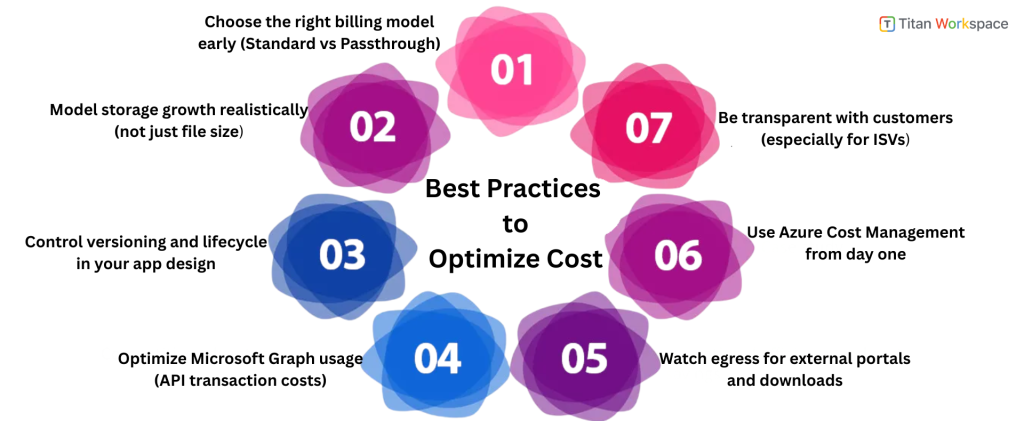
1) Choose the right billing model early (Standard vs Passthrough)
- Decide who should pay for usage: the app owner or the customer.
- ISVs often prefer passthrough billing, so customers see and manage costs in their own Azure subscription.
- Internal enterprise apps often prefer standard billing for centralized budgeting and governance.
Why this matters: changing billing models later can be operationally complex and impact customer contracts.
2) Model storage growth realistically (not just file size)
- Account for File versions, Metadata, Deleted items and recycle bin retention
- Don’t estimate storage only on “current files”; effective storage is usually 20–40% higher due to versions and lifecycle behavior.
Cost driver: long-lived content with frequent updates.
3) Control versioning and lifecycle in your app design
- Set sensible limits on file versions where business appropriate.
- Define lifecycle rules such as Archive old cases/projects and Export and delete closed records when compliance allows
- Avoid keeping inactive content “forever” by default.
Best Practice: lifecycle design is cheaper than storage cleanup later.
4) Optimize Microsoft Graph usage (API transaction costs)
- Reduce “chatty” UI patterns that trigger many small API calls.
- Use batching where possible.
- Cache stable metadata and permissions.
- Avoid polling-based designs when event-based or user-driven updates work.
Rule of thumb: fewer, smarter API calls = lower PAYG spend.
5) Watch egress for external portals and downloads
- High download frequency can quietly increase costs.
- Use preview-first experiences instead of forced downloads.
- Limit repeated downloads of large files where appropriate.
- Educate users with UX nudges (“Preview before download”).
Common oversight: egress spikes in customer/vendor portals.
6) Use Azure Cost Management from day one
- Set Monthly budgets and Alerts for unexpected spikes
- Track usage by environment (dev, test, prod).
- Review trends, not just monthly totals.
Key advantage of PAYG: Transparency if you actively monitor it.
7) Be transparent with customers (especially for ISVs)
If you’re an ISV using SharePoint Embedded:
- Document what drives costs (storage, API usage, downloads).
- Clarify whether billing is standard or passthrough.
- Explain which user behaviours increase consumption (large files, versioning, heavy downloads).
Result: Fewer billing disputes, higher trust, smoother renewals.
Final takeaway for buyers and architects
- SharePoint Online costs are largely predictable through licensing.
- SharePoint Embedded costs are controllable, but only if you design intentionally around storage, API usage, and egress.
- The best implementations treat PAYG as a design input, not a post-deployment surprise.
FAQs: SharePoint Embedded Pricing (Cost & Budget Focus)
Q1: How much does SharePoint Embedded cost per month?
SharePoint Embedded does not have a fixed monthly license. It uses a pay-as-you-go model billed through Azure. Monthly cost depends on three factors: storage consumed, API transactions executed by the app, and data downloads (egress). Higher usage directly increases cost.
Q2: Is SharePoint Embedded cheaper than SharePoint Online?
SharePoint Embedded is not inherently cheaper or more expensive — it is usage driven. SharePoint Online uses predictable per-user licensing, while SharePoint Embedded scales with consumption. It can be cost efficient for application workloads but requires architecture planning to avoid unnecessary API or storage growth.
Q3: What drives the biggest cost in SharePoint Embedded?
Storage is typically the largest cost driver, especially when versioning and deleted content accumulate. API transactions become expensive in high-activity apps, and data egress matters for download-heavy portals. Most production workloads see storage as the primary long-term cost factor.
Q4: Does file versioning increase SharePoint Embedded cost?
Yes. Version history counts toward billable storage. Each additional version consumes space and increases monthly cost. Applications that allow unlimited versioning can unintentionally grow storage bills. Smart lifecycle policies help control long-term spending.
Q5: How do API calls affect SharePoint Embedded pricing?
Every Microsoft Graph transaction initiated by your app contributes to cost. Apps with inefficient or chatty API design can generate millions of unnecessary calls. Batching operations and caching stable data significantly reduces billing impact.
Q6: Are there download or bandwidth charges in SharePoint Embedded?
Yes. Data egress is metered. When users download files, outbound data contributes to monthly cost. This is especially relevant for customer portals or vendor sharing platforms where large files are downloaded frequently.
Q7: Can SharePoint Embedded costs be predicted before deployment?
Yes. Organizations can model expected storage growth, API usage patterns, and download volume to estimate spend. Azure Cost Management tools allow budget alerts and usage tracking, making SharePoint Embedded costs controllable with proper planning.
Q8: How can companies reduce SharePoint Embedded costs?
Costs can be reduced by limiting version history, archiving inactive data, batching API calls, optimizing downloads, and monitoring Azure usage. Application architecture plays a major role in cost efficiency.
Q9: Who pays the SharePoint Embedded bill?
Billing depends on configuration. With standard billing, the app owner’s Azure subscription pays. With passthrough billing, the customer tenant pays directly. ISVs often use passthrough billing, so customers manage their own consumption.
Q10: Is SharePoint-Embedded cost suitable for enterprise workloads?
Yes. SharePoint Embedded is designed for scalable enterprise apps, but it requires cost governance. Enterprises benefit from usage transparency, budget controls, and the ability to scale infrastructure spend with actual demand.
To know more Titan Workspace