Managing access to information is one of the most critical responsibilities for any organization using Microsoft 365. SharePoint, as the backbone of collaboration and a SharePoint Document Management System, provides a powerful but often misunderstood permission model. Many security issues, accidental data exposure, and compliance gaps arise not because SharePoint is insecure—but because permissions are not designed thoughtfully.
This blog explains how SharePoint permissions work, how organizations should approach SharePoint permissions setup, and what SharePoint security best practices you should follow to build a scalable and secure environment. Instead of focusing only on clicks and screens, we’ll look at strategy, governance, and real-world design patterns for SharePoint user access management.
Why SharePoint Permissions Matter More Than Ever
Modern organizations store contracts, HR documents, policies, SOPs, and confidential data inside SharePoint. When permissions are poorly designed:
- Sensitive documents get overshared
- Employees gain access they don’t need
- Compliance audits fail
- IT teams struggle to troubleshoot access issues
A well-planned SharePoint site permission configuration ensures:
- Data security and least-privilege access
- Easier onboarding and offboarding
- Cleaner collaboration across teams
- Long-term scalability without permission chaos
How SharePoint Permissions Work (Conceptual Overview)
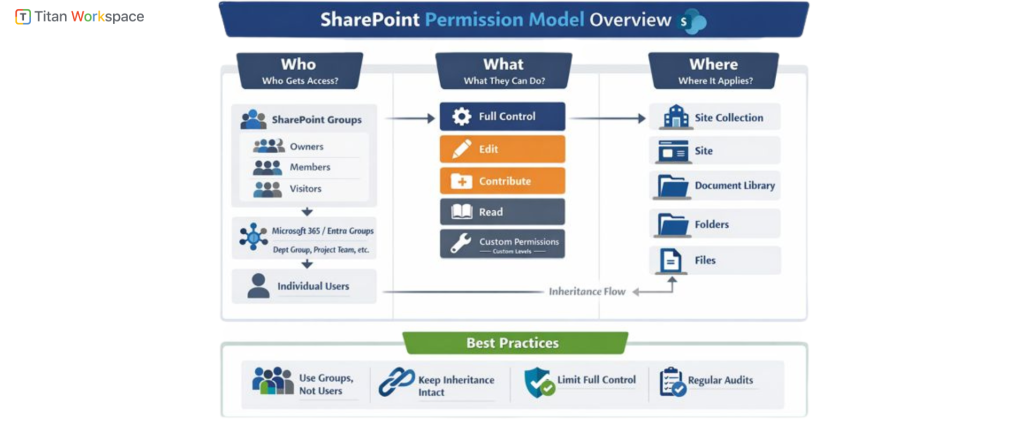
To understand How SharePoint Permissions work, you must first understand its hierarchical security model.
1. Permission Levels (What users can do)
SharePoint permissions are based on predefined or custom permission levels, such as:
- Read
- Contribute
- Edit
- Full Control
Each permission level is a collection of granular rights (view, edit, delete, approve, etc.). Best practice is to reuse standard permission levels rather than create too many custom ones unless absolutely required.
2. SharePoint Groups and Permissions (Who gets access)
Instead of assigning permissions directly to users, SharePoint is designed around groups:
- Owners
- Members
- Visitors
- Custom role-based groups (e.g., HR Editors, Finance Reviewers)
Using SharePoint groups and permissions correctly is the foundation of long-term manageability.
Rule of thumb:
Users → Microsoft 365 Groups / Entra groups → SharePoint Groups → Permission Levels
3. Security Scope (Where permissions apply)
Permissions in SharePoint apply at multiple levels:
- Site collection
- Site
- Document library
- Folder
- Individual file (discouraged except for exceptions)
Each level inherits permissions from its parent unless inheritance is broken.
SharePoint Permissions Setup: Strategic vs Tactical Approach
Many organizations ask, “How to assign permissions in SharePoint Online?”
The better question is:
“What permission design supports our business processes?”
- Tactical (Reactive) Setup
- Assigning users one-by-one
- Breaking inheritance frequently
- Granting Edit or Full Control “just to be safe”
- Managing permissions manually
This approach does not scale.
- Strategic (Recommended) Setup
A strategic SharePoint permissions setup starts with:
- Role-based access design
- Clear ownership and accountability
- Minimal permission inheritance breaks
- Alignment with document classification
SharePoint Security Best Practices for Organizations
1. Design Permissions Around Roles, Not Individuals
Avoid assigning permissions directly to users. Instead:
- Define business roles (HR Admin, Project Member, Auditor)
- Map roles to SharePoint groups
- Add users to groups only
This is core to SharePoint user access management.
2. Keep Permission Inheritance Intact Wherever Possible
Breaking inheritance increases complexity and risk.
Best practice:
- Break inheritance only at library level
- Avoid folder-level permissions unless absolutely required
- Avoid item-level permissions for regular users
3. Use Sites to Enforce Security Boundaries
If two departments should never see each other’s content:
- Use separate sites, not folders
- Let sites represent security boundaries
This dramatically simplifies SharePoint site permission configuration.
4. Limit Full Control Access
Only site owners and IT administrators should have Full Control.
Business users usually only need:
- Read
- Contribute
- Edit
Excessive Full Control is one of the most common SharePoint security mistakes.
5. Align Permissions with Document Lifecycle
In a Document Management System in SharePoint, permissions should evolve:
- Draft → Editors only
- Review → Reviewers + Editors
- Published → Read-only for wider audience
- Archived → Restricted access
This alignment improves both security and compliance.
SharePoint Security Settings You Must Understand
While permissions control who can access, SharePoint security settings define how content behaves.
Key security settings include:
- External sharing controls
- Link expiration and access restrictions
- Sensitivity labels
- Conditional access via Entra ID
- Audit logs and activity tracking
Permissions alone are not enough—security is layered.
Common Permission Models That Work Well
1. Department-Based Model
- Separate sites per department
- Department heads as Owners
- Employees as Members or Visitors
Works well for HR, Finance, Legal.
2. Project-Based Model
- One site per project
- Time-bound access
- External users controlled at site level
Ideal for consulting, engineering, and cross-functional teams.
3. Policy & SOP Model
- Central read-only site for employees
- Restricted edit rights
- Approval-based publishing
Excellent for governance and compliance use cases.
How to Manage SharePoint Site Permissions Long-Term
Setting up permissions is only half the job. How to Manage SharePoint Site Permissions over time is where most organizations struggle.
- Ongoing Best Practices:
- Quarterly permission reviews
- Automated access removal for leavers
- Ownership validation for inactive sites
- Monitoring external user access
Without governance, permissions decay quickly.
- Customizing Permissions for a SharePoint Environment
Sometimes, standard permission levels are not enough.
You may need to Customize permissions for a SharePoint environment when:
- Users can upload but not delete
- Reviewers can comment but not edit
- Contributors need restricted download rights
Customization should be minimal, documented, and consistently reused.
- SharePoint Permissions and Compliance
For regulated industries, permissions support:
- ISO standards
- HIPAA
- GDPR
- SOC 2
- Internal audits
A well-structured SharePoint Document Management System with proper permissions ensures:
- Clear accountability
- Controlled access
- Audit readiness
When Organizations Need SharePoint Permissions Consulting
Many organizations reach a point where internal teams struggle with:
- Inherited permission sprawl
- Over-shared content
- Broken security models
- Audit failures
SharePoint permissions consulting helps by:
- Auditing current access
- Redesigning permission architecture
- Implementing governance models
- Training admins and site owners
Consulting is often faster and safer than attempting cleanup after years of misconfiguration.
SharePoint Permissions Setup vs Traditional File Servers
Unlike file servers:
- SharePoint permissions are metadata-driven
- Collaboration is user-centric
- Security integrates with identity and compliance tools
Organizations that treat SharePoint like a network drive often fail to realize its full security potential.
Final Thoughts: Permissions Are a Design Decision, Not a Click
Understanding How to Set Up Permissions in SharePoint is not about learning where the button is—it’s about designing access, accountability, and governance.
When done right:
- Users get access they need—nothing more
- IT teams regain control
- Compliance becomes easier
- SharePoint becomes a true enterprise-grade Document Management System
If your SharePoint permissions feel complex, inconsistent, or risky, it’s usually a sign that architecture—not technology—needs attention.
Eliminating SharePoint Permission Chaos with Titan Workspace
Managing SharePoint permissions doesn’t have to be complex. Titan Workspace eliminates permission chaos by enforcing role-based access, secure inheritance, and governance-aligned design—helping organizations manage SharePoint site permissions, strengthen SharePoint security best practices, and build a scalable Document Management System in SharePoint with confidence.
FAQ’s About How to Set Up Permissions in SharePoint
FAQ 1: How do SharePoint permissions work in a modern organization?
Answer: SharePoint permissions work through a layered security model that combines users, groups, permission levels, and inheritance. Access is typically granted to SharePoint groups (not individuals), which are assigned permission levels like Read, Contribute, or Edit. These permissions apply at different scopes such as sites, libraries, folders, or files, with inheritance flowing downward unless explicitly broken. This model supports scalable SharePoint user access management and aligns well with enterprise security needs.
FAQ 2: What is the best way to set up SharePoint permissions for a company?
Answer: The best way to set up SharePoint permissions is to design access around business roles instead of individual users. Organizations should use Microsoft 365 or Entra ID groups mapped to SharePoint groups, keep permission inheritance intact wherever possible, and use separate sites as security boundaries. This strategic SharePoint permissions setup improves security, reduces administrative overhead, and supports long-term governance.
FAQ 3: Should permissions be assigned at site, library, folder, or file level in SharePoint?
Answer: Permissions should ideally be assigned at the site or document library level. Folder- and file-level permissions should be used only in rare exception cases because they increase complexity and risk. Keeping permissions higher in the hierarchy simplifies SharePoint site permission configuration, improves performance, and makes audits and troubleshooting much easier.
FAQ 4: How do SharePoint groups and permissions help with security and governance?
Answer: SharePoint groups and permissions help enforce consistent access control by separating “who gets access” from “what they can do.” Groups allow organizations to manage access centrally, reduce errors from direct user assignments, and support automation for onboarding and offboarding. This approach is a core SharePoint security best practice and essential for compliant document management.
FAQ 5: How can SharePoint permissions support a Document Management System?
Answer: In a SharePoint Document Management System, permissions control access throughout the document lifecycle—from draft and review to approval and publishing. By aligning permission levels with document states and business roles, organizations can prevent unauthorized edits, protect sensitive information, and maintain compliance. Proper permissions are foundational to using SharePoint as a secure and scalable Document Management System.
FAQ 6: When should an organization consider SharePoint permissions consulting?
Answer: Organizations should consider SharePoint permissions consulting when they face permission sprawl, accidental oversharing, audit failures, or complex inheritance issues. Consulting helps assess existing SharePoint security settings, redesign permission architecture, implement governance models, and train site owners. This is especially valuable for growing organizations or those operating in regulated industries.