If your organization runs on Microsoft 365 and you’re evaluating audit management software for ISO 9001, you’re standing at a fork in the road. Down one path lies the familiar territory of dedicated GRC and EQMS platforms such as Master Control, ETQ Reliance, Intelex, Audit Board, and their peers. Down the other lies a growing category of SharePoint-native solutions that live inside the Microsoft ecosystem you already use every day.
This isn’t a marketing question. It’s an architectural one and getting it wrong costs quality teams months of implementation time, six figures in licensing, and a permanent context-switch between the tools where policies live and the tools where audits happen.
This guide will help you make that choice with clarity.
Quick Answer: When SharePoint-Based Audit Management Wins
For organizations already committed to Microsoft 365, a SharePoint-based ISO 9001 audit management solution typically delivers lower total cost of ownership, faster implementation, and better user adoption than a standalone GRC platform. The key reason: your policies, SOPs, evidence documents, and users already live in M365. A dedicated GRC tool asks you to build a second home for the same data.
Standalone GRC tools remain the right choice when you need broad enterprise-wide risk consolidation across finance, cyber, vendor, and quality, or when you require highly specialized regulated-industry features (advanced FDA 21 CFR Part 11 workflows, validated GxP environments, or industry-specific integrations that only the incumbents offer).
For everyone else especially manufacturing, aerospace, and process organizations focused on ISO 9001 conformance, SharePoint-based audit management deserves serious consideration.
The Audit Management Pain Compliance Teams Face
Quality and compliance leaders running ISO 9001 audits share a familiar set of frustrations:
- Policies and SOPs live in one place (usually SharePoint or a shared drive). Audit findings, CAPAs, and risk registers live in Excel, another tool, or someone’s inbox. Nothing connects.
- Evidence collection during fieldwork means chasing PDFs, screenshots, and email chains for weeks after the audit closes.
- Non-conformity trends across audits are invisible until surveillance week, when the external auditor asks the question, everyone knew was coming.
- CAPAs slip because there’s no forcing function. A spreadsheet doesn’t email anyone.
- Reporting to management means someone manually pulling numbers into slides the night before the meeting.
These pains are real, and they’re what audit management software is supposed to solve. The question is which category of solution solves them best for your operating context.
The Two Categories of Audit Software (Through an M365 Lens)
Broadly, ISO 9001 audit management software falls into two structural categories:
Category 1: Traditional Standalone GRC and EQMS Platforms
These are purpose-built compliance platforms with their own database, their own UI, their own login, and their own document repository. They’re feature-rich, mature, and often deeply configurable.
Examples include MasterControl, ETQ Reliance, Sparta TrackWise, Veeva QualityOne, Intelex, Greenlight Guru, ServiceNow GRC, and AuditBoard. Each has strengths such as MasterControl is dominant in life sciences, ETQ is strong in manufacturing, AuditBoard leads in internal audit for financial reporting.
What they share structurally: they are separate systems that exist outside your Microsoft 365 tenant.
Category 2: SharePoint and Microsoft 365-Native Solutions
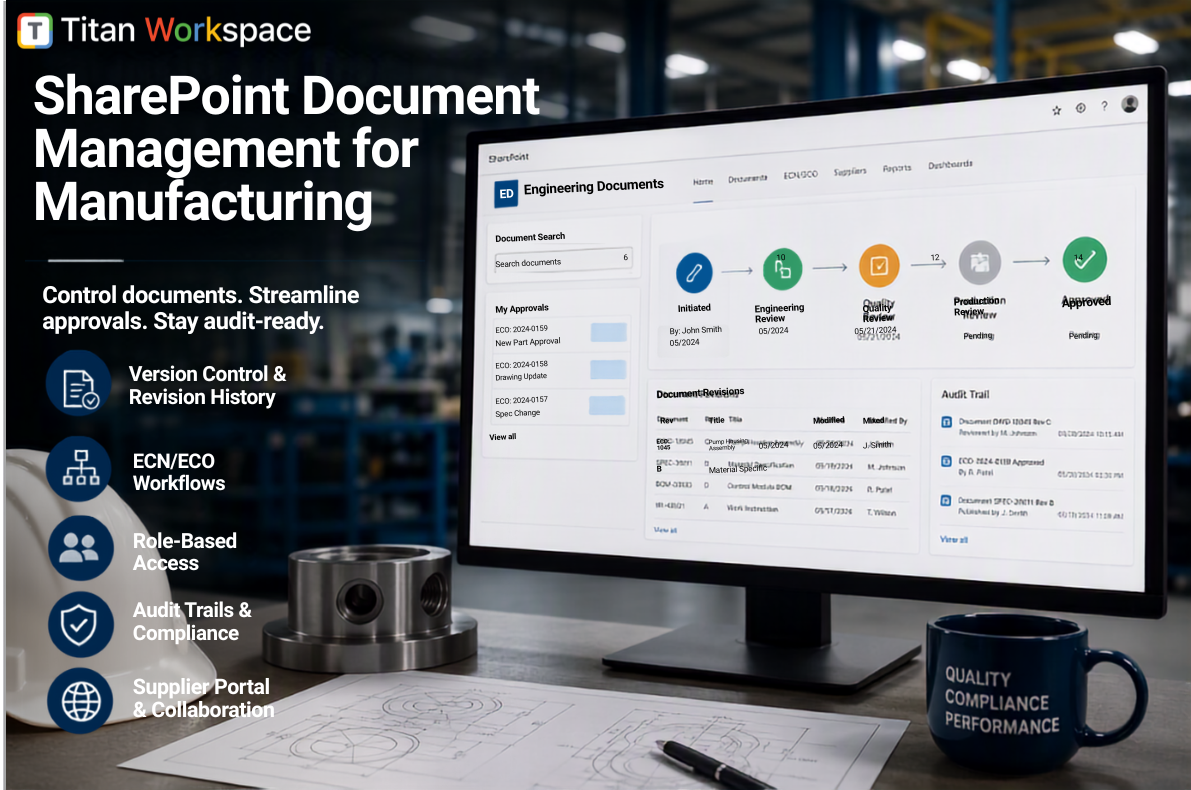
These solutions are built on top of SharePoint Online, using it as the data store, and layering audit-specific workflows on top through Power Automate, SPFx components, and integration with Teams, Power BI, and Azure. Titan Workspace is one such solution.
What they share structurally: they extend the environment you already have rather than replace it.
The rest of this guide compares the two categories for organizations already committed to Microsoft 365.
Where Traditional GRC Tools Fall Short for Microsoft 365 Users
Traditional GRC platforms do many things well. But when the customer is already on M365, four structural problems appear consistently.
1. Data duplication and drift. Your policies already live in SharePoint. A dedicated GRC tool either forces you to move them into its repository (breaking the workflows that already reference them), or it maintains its own parallel copies that immediately begin drifting from the source of truth. Neither is acceptable for an ISO 9001 QMS where the version of an SOP referenced in a finding matters for auditability.
2. Context switching kills adoption. Your users spend their working day in Outlook, Teams, and SharePoint. Every time an audit task appears in a separate portal, they have to log in somewhere else, learn a new interface, and remember to check it. Adoption suffers. Findings get logged in email instead of the tool. CAPAs stall because owners never see them.
3. Integration cost is real and recurring. “It integrates with M365” is often marketing shorthand for “there’s a paid connector that syncs one entity type between the systems, and you’ll rebuild it every time either vendor updates their API.” Native integration with Teams notifications, SharePoint document versioning, Azure AD groups, and Power BI dashboards is rarely as seamless as it looks in the demo.
4. Total cost is higher than the license fee suggests. Enterprise GRC platforms typically cost $50,000–$300,000 per year for a mid-size manufacturer, before implementation. Add professional services (usually 6–18 months at $200–$400 per hour), separate infrastructure security review, separate SSO configuration, and separate compliance certifications to track, and the actual annual burden is significantly higher than the sticker price.
None of this makes traditional GRC tools bad. It makes them structurally mismatched for organizations whose center of gravity is Microsoft 365.
Why SharePoint and Microsoft 365 Make Sense for ISO 9001 Audit Management
For organizations already invested in Microsoft 365, a SharePoint-based audit management solution offers structural advantages that no amount of feature parity can offset.
1. Your policies and evidence already live there
The core artifact of an ISO 9001 audit is documentation such as policies, SOPs, work instructions, calibration records, training records, meeting minutes. In an M365 organization, all of this is already in SharePoint or OneDrive. A SharePoint-native audit tool links directly to those documents by URL. There’s no export-import, no version reconciliation, and when the source document updates, the finding that references it stays in sync.
2. Single sign-on is native, not a paid add-on
Users log in with the same Azure AD identity they use for everything else. No separate password, no separate MFA prompt, no separate SSO integration project during implementation. Access permissions inherit from existing SharePoint groups, so your process owners, quality managers, and external auditor guests all use the identity model your IT team already governs.
3. Microsoft’s compliance certifications transfer to your audit tool
M365 is certified against ISO 27001, ISO 27017, ISO 27018, SOC 2 Type II, HIPAA, GDPR, FedRAMP, and dozens of regional standards. When your audit management tool sits inside your M365 tenant, those certifications apply to your audit data by default. Your CISO doesn’t have to run a separate vendor security assessment for a new platform.
4. Your data stays in your tenant
This is the single biggest concern for aerospace, defense, and regulated manufacturing customers we hear from. With a standalone GRC tool, your audit findings, non-conformities, and root-cause analyses live in the vendor’s cloud. With a SharePoint-native solution, they live in your Microsoft tenant, under your data residency, backup, retention, and DLP policies. Data sovereignty problems disappear.
5. Workflows use tools you already own
Approval flows, notifications, escalations, and reminders are built on Power Automate (a tool your organization is likely already paying for and using). Communications flow through Teams. This means your existing IT admins can maintain the system without hiring specialists for a new platform.
6. Implementation is dramatically faster
A typical enterprise EQMS deployment runs 6–18 months. A SharePoint-based audit module can typically be deployed in weeks because the underlying platform already exists. No infrastructure procurement, no separate security review, no lengthy user provisioning. The bulk of the implementation is configuration and workflow tuning, not building from scratch.
7. Familiar user interface accelerates adoption
Your users know SharePoint. They know how to upload a document, comment on a page, and follow a Teams notification. A SharePoint-native audit tool inherits that familiarity. Contrast this with rolling out a completely new UI to hundreds of process owners, and the adoption gap is obvious.
8. No vendor lock-in on your audit data
If you ever move away from a SharePoint-based tool, your audit records remain in SharePoint. Your policies remain in SharePoint. Only the workflows and custom interfaces need to be replaced. Compare this to migrating out of a dedicated GRC platform, where every finding, CAPA, and evidence link is trapped in a proprietary schema.
Side-by-Side Comparison
| Consideration | Traditional GRC Tool | SharePoint / M365-Based |
| Data location | Vendor cloud | Your M365 tenant |
| Login / SSO | Separate configuration | Native Azure AD |
| Policy linkage | Copy or connector | Direct SharePoint reference |
| Compliance certifications | Vendor’s own; separate review | Inherit M365 certifications |
| Workflow engine | Proprietary | Power Automate (already owned) |
| Reporting | Vendor’s BI or export to Excel | Native Power BI |
| Notifications | Email + in-tool | Teams + Outlook + in-tool |
| Mobile access | Vendor app | SharePoint mobile + web |
| Typical implementation time | 6–18 months | 4–12 weeks |
| Typical annual license (mid-market) | $50K–$300K | $10K–$60K |
| Additional infrastructure | Often required | None |
| User training burden | High (new UI) | Low (familiar UI) |
| Data export on exit | Vendor-controlled | Standard SharePoint export |
| Cross-enterprise risk consolidation | Strong | Growing, module-dependent |
| Deep industry-specific features | Very strong (life sciences, financial) | Depends on solution |
When a Traditional GRC Tool Is Still the Right Choice
Intellectual honesty matters. There are situations where a standalone GRC platform is the better fit even for M365 shops:
- You need enterprise-wide risk consolidation across cybersecurity, financial reporting, third-party vendor risk, and quality in one system. The mature GRC platforms handle this breadth better than any SharePoint-based solution today.
- You operate in a heavily regulated life sciences environment where validated GxP configurations, advanced FDA 21 CFR Part 11 e-signature workflows, and vendor-provided validation documentation are non-negotiable. MasterControl and Veeva have earned their positions here.
- Your quality organization operates independently of IT, and the ability to have the QMS entirely outside of IT-controlled infrastructure is a governance requirement.
- You are not on Microsoft 365 and have no plans to consolidate there. If your organization runs on Google Workspace, a SharePoint-based solution obviously doesn’t apply.
For everyone else especially the manufacturing, aerospace, engineering, and process organizations who form the majority of ISO 9001 certified companies, SharePoint-based audit management is the better structural fit.
What to Look for in a SharePoint-Based Audit Solution
Not all SharePoint-based tools are equal. A few criteria matter:
- Native SPFx components, not just a set of SharePoint lists with a coat of paint. Modern SharePoint Framework components are what give the tool a real audit workflow UX.
- Power Automate-based workflows for stage gating, so your IT team can extend and maintain them without vendor lock-in.
- AI capabilities embedded at real decision points — non-conformity classification, recurrence detection, evidence aggregation, predictive risk scoring. Look past the marketing to see where AI actually reduces human work.
- Real integration with Teams and Power BI, not just SharePoint list views.
- A mature ISO 9001 template with the standard’s clauses, checklist library, and finding taxonomy built in. Building this from scratch on generic SharePoint is a lot of work.
- Clear data model so audits, findings, CAPAs, risks, and evidence relate correctly — not just floating in isolated lists.
- An extensibility path to other standards (ISO 14001, AS9100, IATF 16949) so your investment isn’t stranded when scope expands.
The Bottom Line
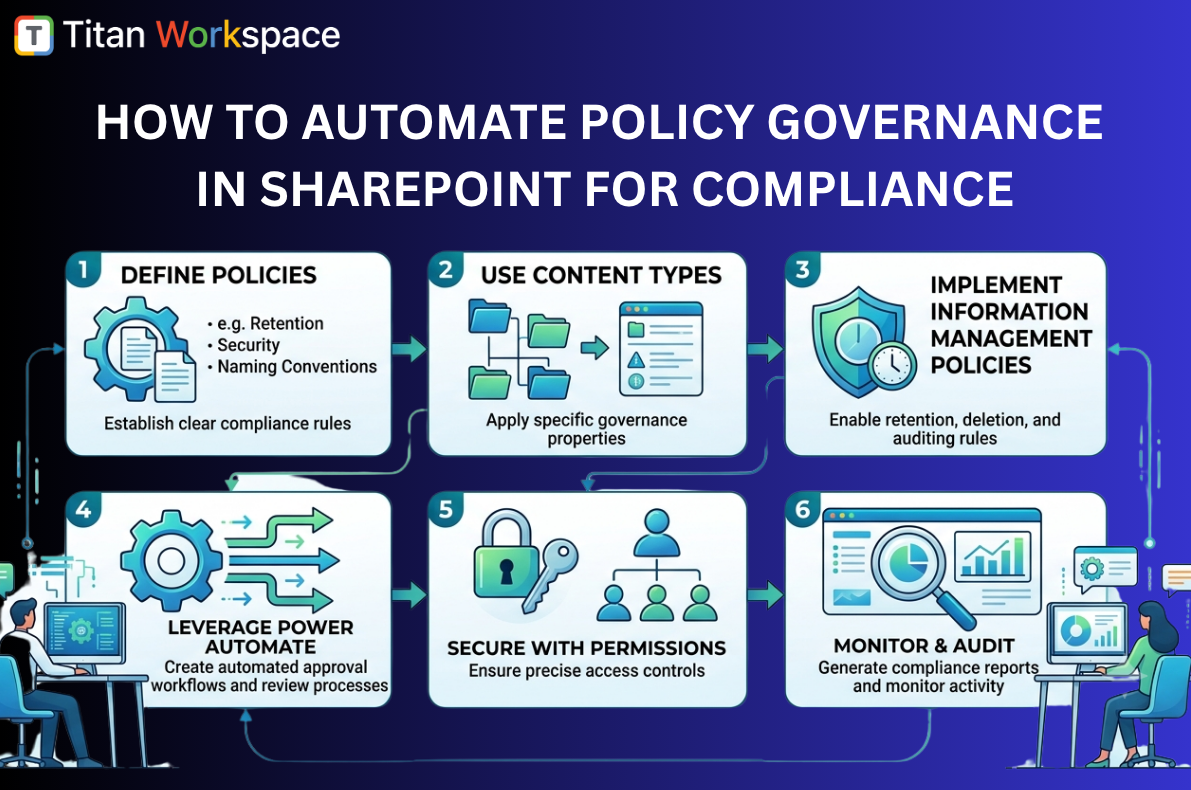
Before embarking on custom SharePoint development for Governance, Risk, and Compliance (GRC), organizations should evaluate whether a purpose-built platform can meet their requirements more efficiently. A growing number of SharePoint-native GRC solutions, including Titan Workspace, provide pre-built capabilities for document governance, policy and SOP management, compliance workflows, approvals, audit trails, employee acknowledgements, and governance reporting while operating entirely within an organization’s existing Microsoft 365 tenant. In many cases, adopting a mature, ready-made platform can reduce implementation risk, shorten time to value, and minimize the ongoing cost and complexity associated with developing and maintaining custom SharePoint applications.
Frequently Asked Questions
1. Can SharePoint really handle full ISO 9001 audit management, or is it just a document library?
Modern SharePoint Online is far more than a document library. With SharePoint Framework (SPFx) components, Power Automate workflows, Azure AD security, and integration with Power BI and Teams, it provides all the building blocks for a full audit management platform — audit planning, checklist execution, non-conformity logging, CAPA workflows, risk registers, evidence libraries, and reporting. Purpose-built solutions like Titan Workspace add the ISO 9001-specific templates, AI capabilities, and pre-built workflows on top, turning SharePoint into a complete audit management system rather than a raw platform.
2. Is a SharePoint-based ISO 9001 audit tool secure enough for aerospace or defense manufacturers?
Yes, and often more so than standalone alternatives. Microsoft 365 carries some of the most comprehensive compliance certifications available: ISO 27001, ISO 27017, ISO 27018, SOC 2 Type II, FedRAMP High, DFARS, ITAR-compliant configurations, and CMMC alignment. Because audit data stays inside your own M365 tenant, it inherits all your existing data residency, DLP, backup, retention, and access controls. Aerospace and defense manufacturers frequently find this easier to defend to their security team than adopting a new vendor cloud.
3. How does a SharePoint audit management solution compare to MasterControl, ETQ Reliance, or Intelex for cost?
SharePoint-based solutions typically cost 60–80% less on annual license fees for mid-market manufacturers, and implementation timelines are usually a fraction of the traditional EQMS platforms. A mid-market MasterControl or ETQ deployment often runs $80,000–$200,000 in annual licensing plus 6–18 months of implementation, whereas a SharePoint-native solution such as Titan Workspace typically deploys in 4–12 weeks with annual costs in the $10,000–$60,000 range. The exact numbers depend on user count, sites, and scope, but the cost differential is consistent across mid-market comparisons.
4. What happens to my audit records if I move away from a SharePoint-based tool later?
This is a genuine advantage of SharePoint-based solutions. Because your audit records, findings, CAPAs, and evidence documents live as native SharePoint list items and files inside your M365 tenant, they remain accessible even if you stop using the audit application. Standard SharePoint export tools produce Excel-compatible outputs, and documents retain their native formats. Compare this to standalone GRC platforms where migrating out means extracting data from a proprietary schema, often through vendor-controlled export processes, and you can see why SharePoint-native tools remove a real strategic risk.
5. Can AI actually add value in ISO 9001 audit management, or is it just marketing?
Well-designed AI in audit management adds significant value at specific decision points — not as a chatbot, but as an embedded assistant. The highest-value hooks are automatic classification of non-conformities against ISO clauses (saving auditor time and improving consistency), similarity search to detect recurring findings across audits (catching systemic issues that manual review misses), automatic linking of findings to relevant policies, predictive risk scoring for pre-audit readiness, and auto-generated draft audit reports. Look for solutions where AI reduces measurable human work, not solutions where AI is a demo feature disconnected from the audit workflow.
6. How long does it take to implement a SharePoint-based ISO 9001 audit management solution?
For most mid-market manufacturers with one to three sites, a SharePoint-based ISO 9001 solution can be deployed in 4–12 weeks. This includes SharePoint schema setup, integration with your existing policy library, security group configuration, workflow deployment via Power Automate, ISO 9001 checklist library loading, AI service configuration, and a pilot audit before broader rollout. Larger multi-site organizations with complex existing QMS structures may take 3–6 months, still substantially faster than the 12–18 month timelines typical of traditional EQMS platforms.
Ready to Explore SharePoint-Based Audit Management?
If your organization runs on Microsoft 365 and you’re feeling the audit pain findings scattered across spreadsheets, CAPAs slipping past due dates, surveillance audits catching you off guard it’s worth exploring what a SharePoint-native audit solution could look like in your environment.
→ Learn more about Titan Workspace’s ISO 9001 audit module
→ Schedule a demo tailored to your M365 environment
About Titan Workspace
Titan Workspace is a SharePoint-native governance, quality, and compliance platform used by manufacturing, aerospace, and process organizations to manage policies, SOPs, attestations, and ISO 9001 audit programs all inside their existing Microsoft 365 tenant.