How Can We Use SharePoint for Compliance and Audit Management?

Organizations today face a complex regulatory landscape: ISO 9001 audits in manufacturing, OSHA inspections in workplace safety, HIPAA compliance in healthcare, and even ATF Form 4473 record-keeping in firearms businesses. Each of these audits requires accurate policies, structured records, and audit-ready evidence.

Microsoft 365 and SharePoint provide a strong foundation for compliance management. However, while SharePoint has powerful out-of-the-box features, it was never designed to handle end-to-end policy compliance, employee acknowledgements, or audit-ready reporting.

That’s where Titan Workspace extends SharePoint into a complete compliance and audit management solution.

SharePoint and Microsoft 365: Policy Compliance Features Out of the Box

SharePoint and Microsoft 365 already provide several compliance-friendly features:

  • Centralized Document Repository – Store ISO manuals, OSHA safety policies, HIPAA forms, or ATF compliance records in structured libraries.
  • Version Control – Maintain document history for policies and SOPs to prove compliance during audits.
  • Microsoft Purview & Compliance Center – Apply retention labels and records management rules aligned with ISO or ATF retention requirements.
  • Access Control & Permissions – Restrict HIPAA-sensitive files or ATF records to only authorized staff.
  • Audit Logs & Monitoring – Track document access and changes for compliance reporting.
  • Data Security & Encryption – Ensure compliance evidence is secured with Microsoft’s enterprise-grade encryption.

These features make SharePoint a strong starting point for compliance management.

Is SharePoint Enough for Compliance and Audit Management?

Yes and no. SharePoint has all the ingredients but lacks the ready-made workflows that compliance managers need:

  1. Native to Microsoft 365 – Already part of most organizations’ infrastructure.
  2. Scalable and Integrated – Works with Teams, Outlook, and Power Automate.
  3. Trusted Security Model – Microsoft 365 carries certifications like ISO 27001, SOC, HIPAA, and FedRAMP.

But when it comes to policy acknowledgements, e-signatures, audit-ready evidence, and compliance dashboards, SharePoint needs heavy customization—driving up cost, IT overhead, and risk of project delays.

Real-World Constraints of SharePoint in Policy Compliance

  • Policy Acknowledgements – No native way to ensure employees have read or signed off on policies (a must for ISO and OSHA audits).
  • Approval Workflows – Out-of-box workflows are too simple for multi-step compliance approvals.
  • E-Signatures – Not supported natively; requires third-party tools or SharePoint Premium subscriptions.
  • Audit Trails – Logs exist but are raw and not presented in audit-friendly formats.
  • Evidence Preparation – Compliance officers often waste weeks preparing evidence from scattered SharePoint libraries.
  • High Customization Costs – Achieving compliance workflows requires developers, consultants, and ongoing IT support.

Titan Workspace: Extending SharePoint for Policy Compliance

Titan Workspace turns SharePoint into a ready-made compliance management system:

  • Policy Publishing & Acknowledgements – Track who has read and accepted ISO, OSHA, HIPAA, or ATF policies.
  • Audit-Ready Evidence – Generate instant reports showing compliance activities.
  • Controlled Document Versioning – Enforce structured version control aligned with auditor expectations.
  • E-Signatures – Capture digital sign-offs directly in SharePoint.
  • Secure External Portals – Share policies with regulators or auditors securely.
  • No-Code Automation – Build compliance workflows without developers or Power Apps.
  • Risk & Fraud Reduction – Replace manual, paper-based policy sign-offs with secure, trackable workflows.

Compliance and Audit Readiness: SharePoint vs. Titan Workspace

Audit / Compliance Type SharePoint Limitation Titan Workspace Advantage
ISO 9001 / ISO 27001 No structured employee policy acknowledgement tracking. Automated policy distribution with acknowledgement reports for ISO auditors.
OSHA (Workplace Safety) Lacks templates for safety incident forms and corrective actions. Digital e-forms & workflows for OSHA reporting, stored in Microsoft 365.
HIPAA (Healthcare) No built-in e-signatures for compliance acknowledgements. Integrated e-signatures with audit trails for healthcare staff compliance.
ATF (Form 4473 & Records) Raw version logs, not auditor-ready. Controlled document versioning & audit-ready reports for ATF inspections.
General Regulatory Audits High IT cost for customization and reporting. Prebuilt compliance dashboards and evidence logs without customization.

Frequently Asked Questions (FAQ)

Q1: Can SharePoint be used for ISO compliance audits?
Yes, SharePoint can store ISO manuals and procedures, but it lacks acknowledgement tracking and structured reporting. Titan Workspace closes this gap with audit-ready dashboards.

Q2: How does SharePoint handle OSHA compliance records?
SharePoint can store OSHA safety documents, but incident reporting and corrective actions usually require customization. Titan Workspace provides ready-to-use digital workflows.

Q3: Is SharePoint HIPAA compliant?
Microsoft 365 is HIPAA compliant at the infrastructure level, but SharePoint does not offer e-signature or acknowledgement tracking. Titan Workspace enables secure sign-offs and policy confirmations.

Q4: What is the best way to manage ATF Form 4473 in SharePoint?
Out-of-box SharePoint is not audit-ready for ATF requirements. Titan Workspace enforces version control and provides structured evidence reports.

Q5: Why is Titan Workspace better than customizing SharePoint?
Custom projects are expensive, time-consuming, and risky. Titan Workspace delivers predictable ROI with ready-made compliance tools built inside your Microsoft 365 tenant.

Conclusion

For organizations facing ISO audits, OSHA inspections, HIPAA compliance reviews, or ATF regulatory checks, SharePoint provides the foundation but not the finish line.

Titan Workspace extends Microsoft 365 into a compliance powerhouse—providing policy acknowledgements, e-signatures, audit-ready reports, and secure external portals.

If your compliance officers spend weeks preparing for audits, Titan Workspace ensures you are audit-ready every day, not just during audit season.

M365 Secure Confidential Files: What You Need to Know

As organizations increasingly rely on Microsoft 365 for collaboration and productivity, the need to protect highly confidential files—even from tenant administrators—has become a top priority. This blog explores how to achieve that level of security, the tools and licenses required, and the technical challenges IT teams face.

Secure Folders in SharePoint Online – Can Microsoft 365 Secure folders and Confidential Files from Tenant Admins?

Yes, Microsoft 365 offers multiple layers of protection to secure files—even from tenant administrators. However, achieving this requires a combination of advanced features, encryption technologies, and careful configuration.

Key Options for Securing Files:

  1. Apply Sensitivity Labels to M365 documents: Apply labels like “Highly Confidential” to restrict access. M365 encryption for files at rest and in transit.
  2. Double Key Encryption (DKE): Ensures that even Microsoft cannot access the data without your second key.
  3. Customer Key (BYOK): Allows organizations to control encryption keys used to protect data in Microsoft 365.
  4. Information Rights Management (IRM): Prevents actions like printing, copying, or forwarding documents.
  5. Privileged Access Management (PAM):Limits what tenant admins can do, using just-in-time access and approval workflows.

These features work together to ensure that sensitive documents are protected from unauthorized access—even from internal IT personnel.


What Tools and Subscriptions Are Needed?

To implement these protections, organizations must integrate several Microsoft tools and services. Here’s a breakdown of each tool, its purpose, and an example use case:

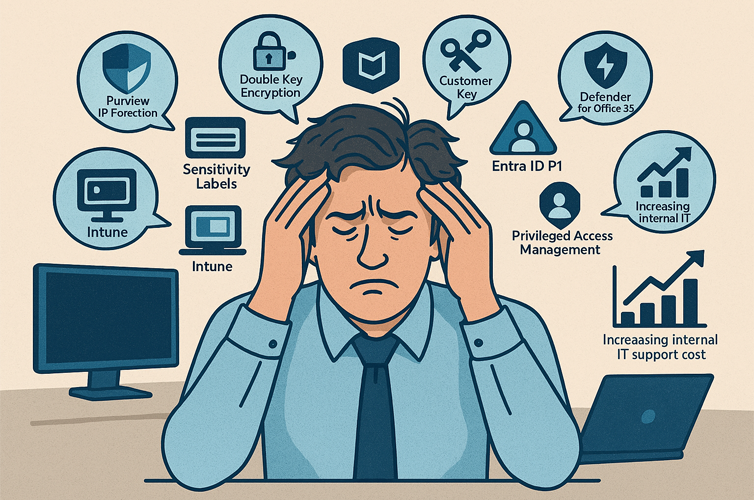
  1. Microsoft Purview Information Protection
    • Purpose: Enables sensitivity labels, encryption, and data classification.
    • Example: Automatically label and encrypt HR files containing employee salaries.
  2. Azure Information Protection (AIP) Plan 1
    • Purpose: Adds manual and automatic labeling capabilities to Microsoft 365 E3 or Business Premium.
    • Example: Apply “Confidential” labels to legal contracts stored in SharePoint.
  3. Double Key Encryption (DKE)
    • Purpose: Provides ultimate control by requiring two keys—one held by Microsoft, one by you.
    • Example: Encrypt board meeting minutes so only authorized executives can decrypt them.
  4. Customer Key (BYOK)
    • Purpose: Lets you manage your own encryption keys for Exchange Online, SharePoint, and OneDrive.
    • Example: Use your own key to encrypt financial reports stored in OneDrive.
  5. Microsoft Defender for Office 365
    • Purpose: Protects against phishing, malware, and data breaches.
    • Example: Block malicious attachments in emails containing sensitive project data.
  6. Microsoft Entra ID P1 (formerly Azure AD Premium P1)
    • Purpose: Enables Conditional Access and identity protection.
    • Example: Require MFA and device compliance before accessing confidential files.
  7. Microsoft Intune
    • Purpose: Manages device and app policies to ensure secure access.
    • Example: Prevent downloads of sensitive files on unmanaged devices.

What Are the Technical Challenges?

While Microsoft 365 offers powerful security tools, implementing them is not plug-and-play. IT teams often face significant hurdles:

  1. Complexity of Configuration
    • Setting up sensitivity labels, DKE, and Customer Key involves deep technical knowledge.
    • Misconfiguration can lead to data loss or access issues
  2. Licensing Confusion
    • Many users struggle to understand which features are included in which license.
    • Example: Sensitivity labels are available in E3, but automatic labeling requires E5 Compliance.
  3. Integration Fatigue
    • Microsoft 365 E5 includes over 50 security tools across six product families.
    • IT teams must constantly monitor updates, dependencies, and compatibility.
  4. Maintenance Burden
    • Ongoing support is needed to manage policies, troubleshoot access issues, and audit compliance.
    • Even large enterprises report high operational overhead.
  5. User Feedback
    • On forums like Reddit and Microsoft Tech Community, admins express frustration:
      • “Even enabling basic security policies feels risky in a live environment.”
      • “Complex security tooling is costly, inefficient, and lacks integration.”

These challenges highlight the need for skilled IT personnel, clear documentation, and ongoing training.

Which Microsoft 365 Licenses Needed for Securing Confidential Files?

Here’s a detailed comparison of Microsoft 365 licenses and their support for advanced file protection:

LicenseSensitivity LabelsEncryptionDKECustomer KeyDefenderPAMNotes
Business Basic
Limited
Not suitable for confidential file protection
Business Standard
Manual
Basic protection only
Business Premium
Manual + AIP
(Plan 1)
Better, but still limited
Microsoft 365 E3
Manual + AIP
(Plan 1)
Good for manual protection
Microsoft 365 E5
Manual + Auto
(Plan 2)
Full protection suite
Microsoft 365 E5 Compliance
Auto + DLP
Add-on for E3 to match E5 security

Final Thoughts

Securing highly confidential files in Microsoft 365 is possible, but it requires:

  1. The right licenses
  2. A combination of security tools
  3. Skilled IT teams to manage and maintain the setup

For organizations handling sensitive data—such as legal, financial, or healthcare information—investing in Microsoft 365 E5 or E3 with compliance add-ons is essential.

Looking for a simpler way to secure confidential files in Microsoft 365? Titan Workspace’s Secure Vault offers enterprise-grade protection for sensitive folders and documents—even from tenant admins—without the need for Microsoft E5 licenses, Purview, or complex configurations. It runs seamlessly on Microsoft 365 Business Standard, eliminating technical overhead and reducing IT support costs. No extra tools, no complex setup—just secure, compliant file protection built for modern businesses

See Secure Vault in action—book a demo today and discover how easy secure collaboration can be.