How Gujarat Fluorochemicals replaced paper trails, email attachments and Excel trackers with one [[governed, searchable document system,]] running entirely inside its own Microsoft 365 tenant.
Enhancing Project and Task Management in a Leadership Development Company
Introduction
One of the leading companies in leadership development and management has over a decade of experience at the forefront of training employee across various organizations. The company has already started spreading its wings all over the world with multiple branches. In 2019 alone the company received a remarkable milestone, including:
- 10,000 People Completed their bespoke leadership and core competency online courses.
- 650 Coaching and mentoring certifications granted.
- 8,000 People Attended leadership programs.
- 20+ Bespoke programs and qualifications developed.
- 5,000 People Attended our assessment centres.
Despite these accomplishments, managing projects and tasks efficiently posed significant challenges due to manual processes. However, the company understood the need for a dedicated task and management tool in education. But with the adaptability of M365 the company needed something that can be directly integrated within the existing Microsoft 365 subscription.
Another desired goal of the company was to find something that can fit to their pre-defined budget and gets integrated within a short span of time without deploying any IT teams over the project.
What challenges arrived with the previous project and task management system?
Operating with manual processes hindered the leading development company’s ability to effectively assign projects to employees and students as well. The sheer volume of tasks, coupled with diverse training programs, made it daunting to streamline operations. Communication gaps between trainers, trainees, and administrative staff further compounded the challenge. As a result, project timelines were often stretched, and resources were underutilized.
How did Titan Workspace help the leading leadership development company with their task and management module?
Recognizing the need for a streamlined approach, the company adopted task management solution to revolutionize their operations. Leveraging modern technology like SharePoint and Power Automate, Titan Workspace introduced a comprehensive solution to address the challenges.
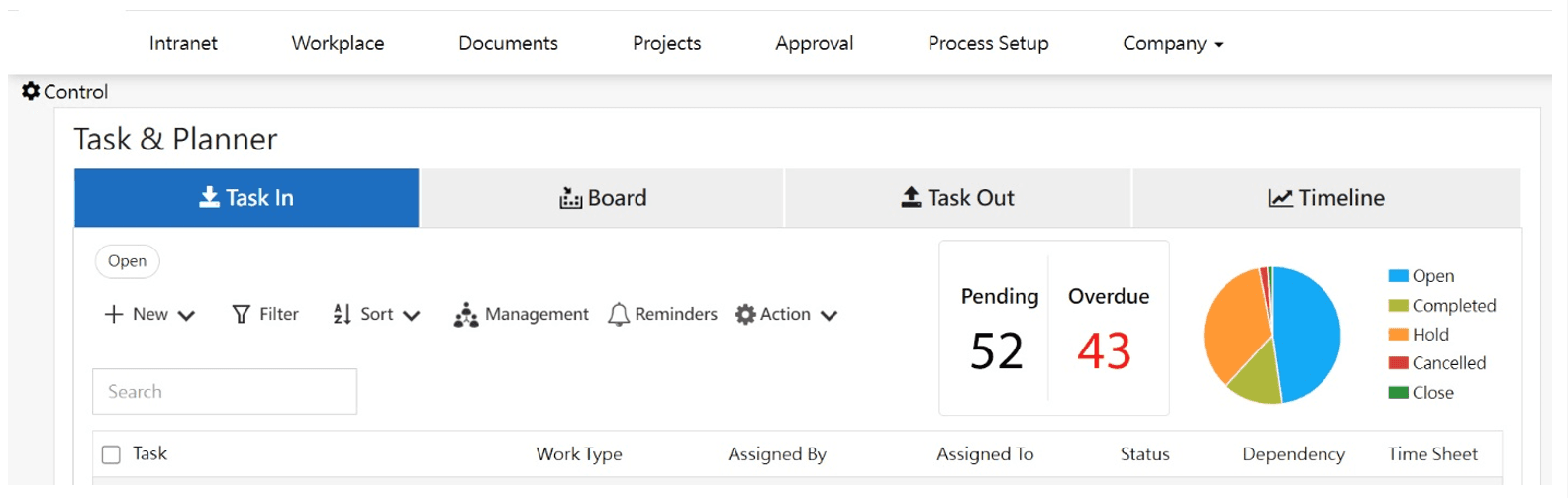
With the educational project management tool, the company was able to achieve:
- Improved Communication: Task management solution facilitated seamless communication between trainers and trainees. Through a centralized platform, participants could access assignments, submit work, and engage in discussions, fostering transparency and collaboration.
- Efficient Task Assignment: Utilizing task management applications, they were able to effortlessly assign responsibilities to various stakeholders. Group tasks were organized based on roles, simplifying delegation, and ensuring clarity in expectations.
- Enhanced Work Schedules: The timeline setting feature enabled the leadership company to establish clear deadlines for tasks, ensuring adherence to project timelines. Automated reminders minimized delays, allowing employees to manage their schedules effectively.
- Collaboration Made Easy: Task management solution in education facilitated collaboration among faculty members and participants. Discussion forums provided a platform for brainstorming and knowledge sharing, enriching the learning experience.
- Streamlined Proofing and Approval: By enabling easy document uploads, the tools simplified the process of proofing and approval boosting 40% productivity. Faculty members could review submissions efficiently, eliminating the need for cumbersome email exchanges. E-signatures made it easier to fasten up the approval process.
- Efficient Document Management: Task management tools offered a centralized repository for documents and files, streamlining document management processes. The intuitive interface and advanced features enhanced the accuracy and speed of finding document with 70%.
Business Benefits of using Project and Task Management in Education
- Cost Saving- The company saved up to 50% of cost by using the task management solution. Moreover, the workforce was able to focus on more strategic task rather than manual tasks and paperwork.
- Increase the Usability of M365: Due to the complexities of M365, company was not able to fully utilize the features. But with Titan Workspace intuitive interface there was a hike of 30% usability rate.
- Improved Productivity: With the streamlined process the company was able to improve their productivity by 40%.
- Reduced Delays and Errors: With automated reminders and process, it became easier for the company to reduce the time taken in completing of projects. It made easier for everyone to keep a track of what’s going on.
Conclusion
The integration of task management tools has significantly transformed the project and task management processes. By leveraging these technologies, they have overcome communication barriers, streamlined workflows, and enhanced collaboration across the organization. As the leadership development company continue to prioritize innovation, they remain committed to delivering exceptional training experiences for employees across diverse industries.
Training and Development Institutions are choosing Titan Workspace’s Intranet for improving internal and External collaboration
Introduction
An esteemed consultancy firm specializing in leadership and organizational development embarked on a journey to optimize their employee training processes. With a rich history of aiding senior leaders, managers, and teams in achieving their organizational goals, the company sought innovative solutions to streamline internal communication and training delivery. However, there were still some challenges that were hampering the internal collaboration of the company. The company was looking for an appropriate solution that can empower the internal collaboration without adding any other third-party apps.
Facing challenges in disseminating news updates and facilitating seamless communication across multiple office locations and with more than 500 employees, the company recognized the need for a centralized platform. Titan Workspace’s Intranet module, a comprehensive intranet solution poised to revolutionize their training framework.
What were the challenges faced by the educational industry while collaborating internally within the organization?
- Sharing news updates and events within the organization across multiple office locations was a challenging and time-consuming process.
- Ensuring consistent and effective communication between trainers and trainees across various geographical locations proved to be challenging.
- Coordinating training sessions and disseminating course materials efficiently was hindered by the lack of a centralized platform.
- Employee engagement was another concern of the company as they wanted a centralized hub to keep all the employees engaged and updated with the latest happenings.
How did Titan Workspace’s Intranet resolve the collaboration challenges of the company?
Recognizing the need for a unified communication and training platform, the company implemented Titan Workspace’s robust intranet solution. By leveraging the features, the company transformed their employee training framework and addressed the following challenges:
- Centralized Communication: Keeps everyone informed with company news, announcements, and updates on the company’s own intranet.
- Seamless Collaboration: Trainers and trainees can easily interact, share insights, success achieved, or any new happening within the organization.
- Streamlined Event Management: Schedule, manage, and track training sessions, workshops, and seminars.
- Data-Driven Improvement: Gain insights into employee performance and training effectiveness to improve future programs.
Benefits of using Titan Workspace’s Intranet Module
By adopting Titan Workspace’s intranet solution, the consultancy firm witnessed significant improvements in their employee training processes:
- Enhanced Communication: The intranet facilitated seamless communication and collaboration, fostering a culture of transparency and knowledge sharing within the organization.
- Greater Engagement: Employees reported higher levels of engagement and satisfaction with the interactive learning experiences enabled by the intranet platform.
- Integration within M365: Leveraging the capabilities of SharePoint and Teams, the company’s intranet was integrated within the existing Microsoft 365 environment. With this, the company eliminated the need for any third-party applications.
- Accessibility: The solution was accessible on any device and from anywhere. People from different locations can visit the intranet anytime from anywhere.
Conclusion
The idea for the company’s own intranet empowered the internal collaboration within the organizations. The ready-made solution was seamlessly integrated within the existing M365 environment of the company. With this centralized hub, employees from all levels and departments were able to get informed with the latest happening within the organization. The company was no more struggling with any collaboration issues even if they had multiple work locations.
Leadership Development Consultancy Customizes Leave Approval Workflow with Titan Workspace
Introduction
A top leadership development consultancy, known for its customized training programs for high-level executives and teams, was battling a familiar foe – a sluggish, paper-based process for leave approval. This outdated system lacked efficiency and transparency, hindering productivity.
To address this challenge, the consultancy sought a modern solution, workflow automation. By implementing leave approval workflow software or solution, they aimed to streamline the entire process. This business automation workflow would empower employees to submit requests electronically from a centralized dashboard, enable managers to review and approve them quickly with automated email reminders, and provide clear visibility into the status of each request. Seamlessly integrate within the existing Microsoft 365 subscription, with an easy intuitive interface that can be easily used by the non-coders as well.
What are the challenges faced by HR department during the manual leave approval process?
The HR department of the leadership development company has a policy where employees are expected to plan the leave for whole year in the starting itself. Manual leave approval processes for such bulk approvals can be riddled with inefficiencies and frustrations for both employees and HR departments.
Here are some of the key challenges:
- Time-Consuming: Manual handling of leave requests takes a significant amount of time, from filling out forms and routing them for approval.
- Prone to Errors: Data entry mistakes can occur when manually transferring information from forms to spreadsheets or HR systems, leading to inaccurate leave balances and potential payroll errors.
- Lack of Transparency: With paper trails and email threads, it can be difficult for employees to track the status of their requests, leading to unnecessary follow-ups and frustration.
- Delayed Approvals: Manual approvals can get bogged down by manager’s busy schedules, leading to delays and potentially impacting project deadlines or team workloads.
- Inefficient Tracking: Monitoring team leave balances and ensuring adequate staffing during peak periods becomes a manual burden in a paper-based system.
- Lack of Reporting: Obtaining insights into leave patterns and trends for better workforce planning becomes difficult with manual data.
Titan Workspace solved the problem of the leading leadership development company with their leave approval workflow
With the implementation of workflow automation module for leave approval the company was able to achieve the desired efficiency and productivity.
Titan Workspace provided them with:
- Automated Workflows: A pre-built leave request workflow was customized to their specific needs. Employees could submit requests electronically, triggering an automated approval chain based on pre-defined parameters.
- Integration within M365: The seamless integration eliminated the need for additional logins, software or any third-party license, ensuring a smooth user experience.
Business Benefits: Efficiency, Transparency, and Improved Employee Experience
The implementation of Titan Workspace resulted in significant improvements for the consultancy:
- Increased Efficiency: Automated workflow management solution eliminated manual tasks and sped up the approval process, freeing up valuable time for HR and managers.
- Enhanced Transparency: Employees gained real-time visibility into the status of their requests through a user-friendly dashboard, reducing unnecessary inquiries.
- Cost reduction: In comparison to the other solution providers, Titan Workspace reduces the cost up to 50% while customizing the leave approval workflow.
Conclusion
By embracing automation with Titan Workspace, the consultancy achieved a more efficient and transparent leave approval process. This not only saved them time and resources but also contributed to a more positive employee experience. With a focus on leadership development, it became clear that leading by example also applied to their own internal processes.
70% Boost in Speed and Accuracy: Training Company Finds Success with Titan Workspace
Introduction
Training and Development companies have a lot to offer. One of these companies boasting over 10,000 graduates in 2019 alone and offering over 20 bespoke courses, faced challenges managing their vast course materials. They needed a user-friendly, secure, and reliable system to streamline their document management.
Being a Microsoft 365 user, they were in search of a solution that can be easily integrated into their existing M365 environment without any third-party app or licence. Apart from this their demand for integration of document management system with the existing project and task management tool was making it more challenging for them to find the right solution. But with Titan Workspace’s document management solution they were able to find a budget-friendly, user-friendly, and a solution that can be customized and integrated into their existing M365 environment in a short span of time.
What were the problems with the previous document management system?
Switching to the digital era wasn’t easy and since they were using various other automated workflows like leave approval and project task management, handling document physically and manually was becoming challenging for them. Various other factors included:
- Time-Consuming Document Handling: Employees spent a significant amount of time locating, retrieving, and managing documents.
- Risk of Human Error: Manual entry and handling increased the likelihood of errors, leading to inconsistencies and potential compliance issues.
- Inefficient Collaboration: Sharing and collaborating on documents across departments was cumbersome and inefficient.
- Limited Accessibility: Documents were often stored in physical files or disparate digital locations, making it difficult for remote employees to access them.
- Security Concerns: Protecting sensitive information and ensuring only authorized personnel had access to specific documents was challenging.
How did Titan Workspace solved the problem?
Titan Workspace’s document management system module was customized according to the needs and demands of the company. The customization included:
- DMS Integrated within Existing M365: The seamless integration of Titan Workspace’s DMS with Microsoft 365 allowed for easy adoption and use within the company’s existing digital ecosystem.
- E-Sign Features: The inclusion of electronic signature capabilities streamlined the approval processes, reducing the need for physical signatures and accelerating document turnaround times.
- Advanced Search Features: Powerful search functionalities enabled employees to quickly locate documents using various criteria, significantly reducing the time spent on document retrieval.
- Group Library: The Group Library feature facilitated organized and centralized storage of documents, ensuring easy access and management by relevant teams.
- Seamless Integration with Existing Project and Task Management: Integrating the DMS with the company’s existing project and task management tools ensured a smooth workflow, with documents readily available where and when needed.
What were the benefits of using Titan Workspace’s Document Management System?
- Increased Efficiency: Streamlined document handling and retrieval processes saved up to 50% time for employees.
- Enhanced Accuracy: With the top-notch search features 70% accuracy was observed while finding the right documents within the organization.
- Improved Collaboration: Centralized document storage and easy sharing features improved inter-departmental collaboration.
- Better Accessibility: Remote employees gained easier access to necessary documents, supporting flexible work arrangements.
- Heightened Security: Enhanced security features ensured that sensitive documents were accessible only to authorized personnel, improving overall data protection.
Conclusion
By integrating Titan Workspace’s Document Management System, the training and development company overcame the inefficiencies and risks associated with their previous manual processes. The transition not only streamlined their documentation workflows but also enhanced collaboration, accuracy, and security across the organization. This case study demonstrates the significant impact of adopting an advanced DMS in improving operational efficiency and supporting the company’s growth and success.
Leadership Development Company automated expense management with Titan Workspace
Introduction
An esteemed consultancy firm in leadership and organizational development, one of leading company operates at the forefront of fostering excellence in senior leaders, managers, and teams. With a profound understanding of the UAE’s cultural nuances, they specialize in crafting tailored assessments and development solutions essential for organizational triumph. Initially rooted in collaborations with the public sector and government ministries, they have expanded their services to cater to a broader business audience. With the growing business the finance department of the company felt trapped in the manual expense report management and demanded for an automation solution.
However, the demand was not limited only till the automated expense management solution, but they also demanded a solution suitable for their existing Microsoft 365 environment for increasing the usability. In addition to these the company had a fixed budget that could be spent on the solution.
What were the challenges faced by the Leadership Development Company in manual expense reporting?
- Manual Processes: Handling expense reports manually led to significant inefficiencies, resulting in substantial delays and a high propensity for errors. This laborious approach hindered productivity and compromised accuracy within the finance department.
- Email Chaos: The overwhelming influx of emails for expense approvals and submissions created a chaotic environment, breeding confusion and further exacerbating inefficiencies within the organization.
- Lack of Transparency: With disparate systems in place for expense management, maintaining transparency in tracking expenses became increasingly difficult, leading to potential inaccuracies and discrepancies in financial records.
- Technical Challenges: With a limited workforce in the finance department of the company was not ready to provide a dedicated IT team for coding and technical learning. So intuitive interface was another thing they were concerned before switching to a new solution.
To address these challenges, the organization could benefit from implementing an automated expense management system that leverages SharePoint and Power Automate. By embracing automated expenses and automating expense reports, the company can streamline processes, reduce errors, and enhance transparency.
An automated expense management solution can provide a centralized platform for employees to submit expenses electronically, minimizing manual data entry and ensuring accuracy.
How did Titan Workspace solved the problem of Leadership development company?
The company opted for Titan Workspace’s workflow automation solution to revolutionize their expense reporting system, addressing the upcoming challenges:
- Customized Workflow: After understanding the whole process and number of steps the workflow was customized following their hierarchy of approvals. For customizing the expense report automation, SharePoint and Power Automation was leveraged.
- Integration within M365: Leveraging the seamless integration capabilities of Titan Workspace with Microsoft 365, the company unified their expense reporting process within their existing ecosystem, ensuring smooth data flow and enhanced collaboration.
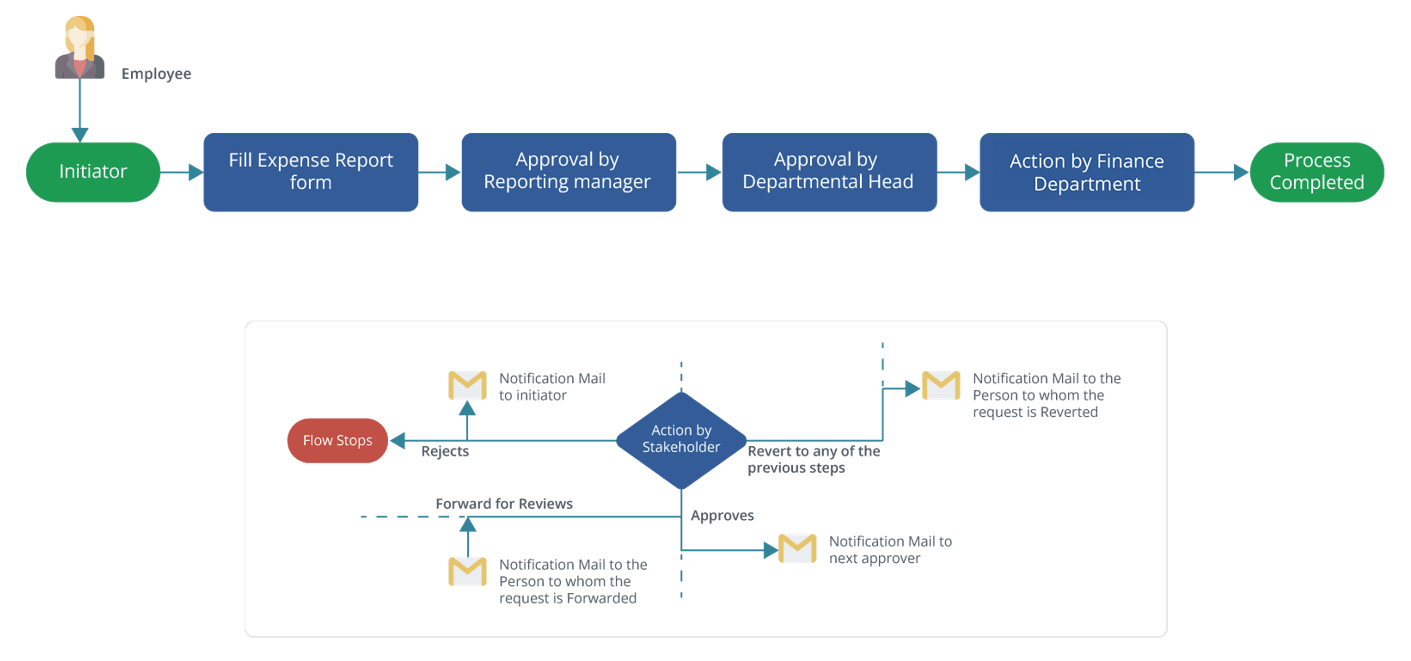
Were there any business benefits of using Titan Workspace’s workflow automation solution?
- Efficiency Enhancement: By automating expense report automation, the company witnessed a substantial boost in efficiency with almost 40%, with reduced processing times and minimized errors.
- Cost Savings: The elimination of manual processes and the associated overhead costs led to considerable savings for the company. Moreover, automation with Titan Workspace saved up to 50% for the leadership development company.
- Enhanced Transparency: With a centralized platform for expense management, the company achieved greater transparency, enabling real-time tracking and analysis of expenses.
- Improved Employee Experience: Employees of the finance department experienced a seamless and user-friendly expense reporting process, contributing to overall satisfaction and productivity. The solution increased the usability of M365 within the organization.
Conclusion
In embracing Titan Workspace for expense report automation, the leadership development consultancy firm successfully addressed the challenges posed by manual processes, email chaos, and lack of transparency. With streamlined workflows, integration within Microsoft 365, and tangible business benefits, the company has positioned itself for sustained growth and efficiency in its operations, further reinforcing its commitment to excellence in leadership and organizational development.
Streamlining Research Management system: How a leading pharmaceutical company saved up to 60% of cost and time by automating workflows with Titan Workspace
Introduction
A leading pharmaceutical company faced inefficiencies in managing their projects within their research management system. Heavy reliance on email communication resulted in scattered information and hindered collaboration and project visibility. To address this, they sought a workflow automation system tailored to their specific needs. This case study explores how a no/low code platform provided a customized solution, transforming their research management process.
They desired a centralized platform to consolidate all project tasks and communication, eliminating the chaos of email threads. Furthermore, they envisioned a system with structured approvals, featuring a pre-defined workflow with multiple steps (more than 7 steps) for efficient decision-making. Finally, they craved enhanced visibility, with real-time project insights to ensure better control over resources and project health. This comprehensive system would empower them to optimize their research process and expedite valuable discoveries.
What were the challenges faced by the leading pharmaceutical companies?
- Email Dependency: Communication relied heavily on emails, leading to scattered information flow and difficulty in tracking progress.
- Inefficient Approvals: The lack of a structured approval process created delays and bottlenecks. There was no clarity about when the project is started and what is the initial and ending point.
- Limited Visibility: Project managers struggled to maintain a clear overview of the research lifecycle due to scattered information.
How Titan Workspace overcame the challenges faced?
A no/low code platform delivered a customized project and task management module:
Centralized Task Management: A central dashboard streamlined task creation, assignment, and tracking, fostering collaboration.
Customizable Workflows: Workflows were designed to mirror the company’s specific approval process, ensuring tasks progressed through the designated stages efficiently. The easy-to-use solution allowed the employees to add and remove project members accordingly.
Visibility and Reporting: Project managers gained real-time insights into project progress, deadlines, and resource utilization through insightful reports and dashboards.
Automated Emails: Each step of the automated workflow was followed by an automated email informing the team members about the task status and improvement.
Chat within Microsoft Team: Titan Workspace enabled teams chat within the projects so that they can coordinate easily without facing any challenges with email chaos.
What were the benefits of using workflow automation module for research management systems?
The leading pharmaceutical company experienced significant improvements:
- Reduced Email Reliance: Centralized communication within the platform eliminated reliance on cluttered email threads.
- Faster Approvals: Standardized and automated workflows expedited approvals, minimizing delays and bottlenecks. Faster approvals improved productivity by 40%.
- Improved Project Visibility: Enhanced dashboards provided project managers with a clear picture of resource allocation and project health.
- Better Collaboration: The streamlined process facilitated faster project completion as it was now easier to communicate with the respective members of the respective project.
- Cost Savings: The leading pharmaceutical company saved up to 60% by automating tasks with Titan Workspace.
Conclusion
This case study demonstrates how a no/low code platform empowered a leading pharmaceutical company to overcome challenges with their research management system and optimize their process. By implementing the workflow automation module, they not only streamlined the tasks but also saved hours on each project gaining more productivity and efficiency.
Leading Pharmaceutical Company streamlines compliance and improves document tracking by 70% with Titan Workspace
Introduction
Pharmaceutical companies operate in a highly regulated environment where document management plays a critical role in ensuring compliance, maintaining quality standards, and facilitating collaboration among cross-functional teams. Effective document management for pharmaceutical companies is essential for streamlining processes, reducing operational costs, and minimizing the risk of non-compliance.
In the pharmaceutical industry, where new regulations and guidelines are constantly emerging, companies must adapt their document management strategies to stay ahead of the curve. Inefficient document management practices can lead to costly errors, delays in product development, and potential regulatory penalties.
One leading pharmaceutical company recognized the need to overhaul its document management processes to address growing challenges and maintain its competitive edge. The company was in search of a document management system that aligns with their existing project management and automated workflows. Also, they demanded the solution to be budget-friendly, customized within a short period of time and integrated within the existing Microsoft 365.
What were the challenges faced by the company?
- Siloed and disparate document repositories across departments, leading to version control issues and duplicated efforts.
- Lack of a centralized platform for document collaboration, review, and approval workflows, hindering productivity and decision-making.
- Inefficient tracking of document revisions and feedback, making it difficult to maintain audit trails and regulatory compliance.
- Limited visibility into document lifecycle stages, resulting in delays and bottlenecks in critical processes.
- Inadequate security measures for sensitive and confidential documents, posing potential risks to intellectual property and regulatory requirements.
- Frequent oversight of compliance due to manual tracking of documents.
How did Titan Workspace solve the problem?
To address these challenges, the pharmaceutical company partnered with Titan Workspace to implement a custom document management system for pharmaceutical business built on the robust SharePoint platform. The solution was designed to streamline document-centric processes, enhance collaboration, and ensure compliance with industry standards.
The benefits of the solution included:
- Centralized document repository with granular access controls and version control capabilities.
- Automated workflow management for document review, approval, and distribution processes.
- Integration with Power Automate for seamless notifications, reminders, and task assignments.
- Comprehensive audit trails and revision history tracking for regulatory compliance and transparency.
- Advanced search and filtering capabilities for efficient document retrieval and organization.
- The document management system was aligned in such a way that it makes other modules like project management and automated workflows an ease.
- Mobile-friendly interface for on-the-go access and document management.
Did the solution make any benefits to the pharmaceutical company?
- Enhanced collaboration and communication among cross-functional teams, accelerating decision-making processes and increasing productivity by 40%
- Improved version control and reduced duplication of efforts, leading to increased efficiency.
- Streamlined document review and approval workflows, minimizing delays and bottlenecks.
- Robust audit trails and revision histories, ensuring regulatory compliance and traceability.
- Tighter security controls and access management for sensitive and confidential documents. Document security was enhanced by 60%
- Increased visibility into document lifecycle stages, enabling proactive monitoring and timely interventions.
- Seamless integration with existing systems and applications, facilitating a smooth transition, user adoption and saving them almost 50% from other solutions
Conclusion
By implementing the document management system, the leading pharmaceutical company has not only optimized its document-centric processes but has also fostered a culture of collaboration, transparency, and compliance. The solution has empowered employees with the tools and insights needed to drive innovation, maintain quality standards, and stay ahead in the highly competitive pharmaceutical landscape.
Leading Infotech company implemented IT document management system to manage various projects and clients
Introduction
With the ever-growing business landscape, the demand for technological solutions continues to grow. Although IT companies are always there with their top-notch services, they often find themselves managing multiple projects for various clients simultaneously. As soon they take over a project it comes with multiple documentation, from project plans to contracts, creating a challenge to efficiently organize and access these documents. The IT document management system is crucial for maintaining productivity and ensuring client satisfaction. However, with the increasing complexity of projects, manually managing documents becomes cumbersome and prone to errors.
The company was in search of an effecting IT document management system for M365 that can be quickly configured as per to their needs but within their budgets. Titan Workspace understood the demand of the growing IT company and solved their problems with document management system module.
What were the major challenges faced by the IT company?
Prior to implementing a DMS, the IT company faced several challenges in managing project documents efficiently. These challenges included:
1. Manual Process: The dependency on manual methods such as email chains for document sharing and approval led to inefficiencies and delays in project workflows. Moreover, it was tough to track and align it with the existing project and task management system.
2. Lack of Transparency: Tracking the status of documents and identifying bottlenecks in the approval process was challenging due to the absence of a centralized system.
3.Time-Consuming Processes: Manual document handling resulted in prolonged processing times, impacting project timelines and delivery schedules.
4. Paperwork Overload: Managing extensive paperwork for each project consumed valuable time and resources, making it difficult to track and organize documents effectively.
5. Records management: Filing a document in the absence of a proper records management system was reducing productivity as employees were taking more than the required time to get right document with the latest versioning.
How did Titan Workspace solve their problem with DMS module?
To address these challenges, the IT company partnered with Titan Workspace to implement a customized IT Document Management System. Titan Workspace offered the following solutions:
1. Seamless Integration with Existing Systems: Titan Workspace seamlessly integrated its DMS with the company’s existing Microsoft 365 subscription, ensuring compatibility and ease of implementation.
2. Customization: Tailored document libraries were created for each client and project, allowing for organized storage and easy retrieval of documents.
3. Enhanced Security Measures: Titan Workspace provided a secure portal to store confidential documents, ensuring data integrity and compliance with privacy regulations. Granular access ensured the safety of confidential documents.
4. Intuitive Interface: Titan Workspace’s DMS boasted an intuitive interface, enabling effortless navigation and quick document retrieval, thereby enhancing user productivity and adoption rates.
What were the benefits of using Titan Workspace’s DMS module?
The implementation of Titan Workspace’s DMS yielded significant benefits for the IT company:
1. Cost-Effectiveness: Integration within the existing Microsoft 365 subscription resulted in cost savings, eliminating the need for additional infrastructure or software.
2. Productivity Improvement: With streamlined document management processes, productivity increased by up to 60%, enabling teams to focus more on project deliverables rather than administrative tasks.
3. Transparency Enhancement: The centralized DMS provided visibility into document status and workflow progress, improving transparency and accountability across teams.
4. Time Savings: By eliminating manual document handling processes, the company saved valuable time that would have otherwise been spent on administrative tasks.
Conclusion
The new Document Management System from Titan Workspace helped the IT company solve their document management problems. It made processes simpler, improved teamwork, and kept documents secure. The system was customized for the company’s needs and integrated smoothly. With better document management, the IT company could focus on providing great service to clients while effectively handling project documents. The Titan Workspace solution boosted efficiency and productivity for the IT company.
Automobile Manufacturing Giant Enhanced Document Security and Search Capabilities By 70% With Titan Workspace
Introduction
Imagine a scene straight out of a workplace sitcom: A frustrated engineer frantically searches their computer for a crucial purchase order. Dead ends abound – local folders, shared drives, emails – each holding a different version of the document. Time ticks by as they desperately seek the latest revision. This scenario, unfortunately, played out all too often for the purchase department at a leading automobile manufacturer. The lack of access control of document management system was making it tough for the manufacturing company to securely share the check the latest version of the documents.
Creating a central repository within OneDrive wasn’t feasible and learning the intricacies of SharePoint felt like scaling Mount Everest for busy employees. The company understood the need for a document management system that can not only provide attribute based access control for document management system, but will also be implemented within their existing M365 system at a pocket-friendly price.
Desperate for a solution, the manufacturer turned to Titan Workspace for DMS solution. This user-friendly document management system became the hero they never knew they needed. The DMS empowered the purchase department to create a departmental document library, putting an end to the document diaspora. Here’s how Titan Workspace became a game-changer.
What were the challenges faced by the leading automobile manufacturer?
- Scattered Documents: Crucial purchase order documents were housed in various locations, including local machines, shared drives, and emails. This lack of centralization made it difficult to locate the latest version and hampered collaboration.
- Version Control Woes: Multiple versions of documents existed, leading to confusion and potential errors. Determining the most up-to-date version became a time-consuming task.
- IT Bottleneck: The purchase department relied heavily on IT for secure file sharing with role based access control for document management system. This created a bottleneck, delaying workflows and hindering productivity.
- Limited Repository Options: Creating a central repository within OneDrive proved impractical. Learning a complex system like SharePoint wasn’t a viable option for busy employees who needed a user-friendly solution.
How did Titan Workspace manage to tackle the challenges?
The implementation of Titan Workspace Document Management System (DMS) addressed these challenges comprehensively:
- Access Control Features: Titan Workspace DMS boasts an intuitive permission console. Departmental users can now manage mandatory access control with ease, ensuring the right personnel have the necessary permissions without needing in-depth SharePoint knowledge.
- Robust Search Functionality: Locating documents is a breeze with powerful search features. Users can identify the latest versions quickly and efficiently, saving valuable time previously spent sifting through endless folders or outdated versions.
- 24/7 Accessibility: Titan Workspace’s DMS allows secure document access from any device, at any time. This fosters seamless collaboration across teams and locations, regardless of traditional working hours.
What were the benefits of implementing Titan Workspace’s Document management system?
- Improved Efficiency: Centralized document storage with access control for document management system and robust search capabilities significantly increasing productivity by 70%
- Enhanced Productivity: With readily available and up-to-date documents, the purchase department experiences a 40% boost in response time.
- Reduced IT Burden: Titan DMS empowers departmental users to manage documents with attribute based access control. This frees up valuable IT resources previously dedicated to handling document sharing requests, leading to a 70-hour monthly time saving for the IT department.
- Cost Savings: Increased efficiency, shortened turnaround times, and reduced IT workload culminate in significant cost savings for the organization. Time saved is money earned, and Titan Workspace DMS helps unlock this valuable resource.
Conclusion
By implementing Titan Workspace DMS, a leading automobile manufacturer transformed its document management landscape with access control for document management systems. Scattered documents and version control issues are a thing of the past.
The solution empowers the purchase department to collaborate effectively, improve efficiency, and ultimately, contribute to the organization’s success. This case study serves as a testament to the transformative power of user-friendly document management solutions in the competitive automotive industry.