Document Management Systems within MS Teams

“Teams is the new OS” said Gavriella Schuster, vice president of One Commercial Partner at Microsoft, during a keynote talk last week hosted by the Southern California chapter of the International Association of Microsoft Channel Partners (IAMCP).

During the last few months, Microsoft has been very aggressive and positive when it comes to MS Teams. The speed at which companies are adopting Teams is amazing. I believe that the success of Teams is attributed to its simple framework that offers flexibility & capability to add more information to your Teams and build applications around it.

Our product Titan Workspace has brought power of SharePoint within Teams to offer seamless experience of true collaboration for any enterprise. One of the important feature that I want to highlight today is the extended capability of Teams to manage documents within Teams.

Titan Workspace adds more power to Teams with Document Management capabilities:

Titan Workspace offers more flexibility to manage documents within Teams. User can now enjoy additional features within Teams with the help of Titan Workspace:

a) My Documents: To store user documents the way you store in local machine. This online feature allows you to share with selective users within your active directory. User can now decide permissions such as read or edit for each individual sharing. No other users can access other member’s My Documents unless allowed. You can now switch between your Teams documents and My Documents from within Teams.

b) Document properties: Add metadata and properties to your files. Make them searchable with relevant search results.

c) Departmental documents: There is a place for all the members of a particular department to store and share documents within Teams. One can now decide if any particular document to be made accessible only to department co-worker or all employees.

d) Shared with me: We have resolved the pain of searching shared documents within your outlook inbox. Now you have a dedicated place within Teams to access all the documents that your co-workers have shared with you. You can search and access the latest version of documents. No more cluttered e-mail Inbox for your shared documents.

e) One Drive: You can access your One Drive documents from within Teams. You do not have to open a separate One Drive application to access your documents.

Sharepoint can add lots of value to MS Teams if integrated with simplified approach. We love this integration and our product development team will introduce more innovative features within Titan Workspace to make your MS Teams experience even better. Titan Workspace with Teams is a great recipe for effective collaboration and higher productivity for your employees.

Sharepoint can add lots of value to MS Teams if integrated with simplified approach. We love this integration and our product development team will introduce more innovative features within Titan Workspace to make your MS Teams experience even better. Titan Workspace with Teams is a great recipe for effective collaboration and higher productivity for your employees.

Why Your Business Should Use Intranet

In the most recent Social Media Fact Sheet published by Pew Research Center, seven in ten Americans are now using social media platforms for communication, engagement, and entertainment. That means 72% of the population of the United States are using some kind of social network for different purposes. Approximately 74% of the people surveyed who use Facebook use it daily at least once per day.

These numbers mean that social media is a pervasive thing and takes up a good chunk out of a person’s time every day. Social media use can even affect the behaviors of employees in the workplace. But instead of banning social platforms from an office, organizations can leverage it for productivity, research, and engagement.

That is where a social intranet comes in. This tool is an internal platform where employees connect with each other for digital socialization and for work. It has the trademark elements of a social media website such as profiles, news feeds, and online communities. However, what makes it different is the multifarious productivity tools it includes.

The different examples of social intranet out there mix and match these tools in their own way. But if you are thinking of signing up for one any time soon, you can consider the following reasons why your business should have a social intranet.

The Advantages of a Social Intranet

1. Develop an Engaging and Social Environment at Work

Intranets are not a new thing in the workplace but their use is mostly confined to tasks, meetings, and company events. But their use extends beyond that. For example, you can leverage a social intranet software to build and develop an engaging and social environment within (and maybe without) your work premises.

That is because a social intranet is an inclusive space where anyone, regardless of their department or role, can join in the conversation. This allows members of the organization to interact with people they do not talk to normally nor even see in the hallways.

By enabling your employees to build strong relationships, you strengthen the foundations of your organization as well.

2. Foster a Positive Organizational Culture

When the people that make up the backbone of your company are engaged outside of their normal work responsibilities, they can create a more cohesive environment where everyone is welcome. A social intranet can facilitate this because it allows every worker to post, to listen, and to respond. With this healthy discussion around different topics, such as your organization’s programs and social responsibility, you can foster loyalty and satisfaction.

Furthermore, employees can become more comfortable in the workplace because they know they have peers who share their likes, passions, and hobbies.

3. Uncover Actionable Intelligence

A social intranet platform can serve as a listening post for your administration. This means that you can see what is going on in the minds’ of your workers and use the intelligence you gain to enhance your processes and even products. Because apart from helping your company reach greater heights, these people are also consumers. By knowing what they think about certain topics, you can uncover market trends. Plus, you can elevate their ideas and use them to enhance your offerings and customer service.

4. Highlight the Hard Workers and New Members

There are social intranet providers that offer a wide variety of tools, including a spotlight board. This is where you can highlight the best members of a team each month and introduce new members of the organization.

When you apply gamification to several facets of the company, you can look forward to increased engagement and productivity. In fact, according to an article published on Medium’s The Startup, 90% of employees experience enhanced productivity because of gamification.

Moreover, the announcement board allows employees to learn more about their colleagues and be aware of the changes that occur internally.

5. Go Beyond Email and Phone for Productivity

Among the social intranet tools available on a platform are task management, project sites, and document repository. While the main purpose of a social intranet is to enable members of the organization to interact with each other, it can also serve as a digital environment for team collaboration.

Despite the ubiquity of communication and collaboration applications, many workplaces still rely heavily on emails and telephone calls. You can be revolutionary by implementing a social intranet within the workplace. This allows project teams to work on a single platform where they can also assign and keep track of their tasks as well as share information with each other.

What makes this advantageous is that you no longer need to have separate applications for streamlined work conversations, exchange of ideas, and distributing files. Thus, you can eliminate the trouble collaborating with your team brings.

Considering a Social Intranet for Your Business

The traditional social intranet is limited only to a few members of the organization, with authorship or administrative permissions further narrowed down. The modern take, however, makes the intranet a more open space to promote widespread interaction and exchanges between employees. This is something that you have to keep in mind when choosing a social intranet for your organization so that you can leverage it–and the minds of your workers–fully.

Office 365 – The New Lifeline of SMEs

My recent interactions with SMEs in India have brought some of the most interesting findings to the table. It is their willingness to stop piracy by using Office 365 thereby making use of SaaS (subscription based payment on monthly basis). Further digging into this, I found two very important observations.

Firstly, they are excited with O365 offerings that has latest version of Office, 24×7 e-mail, Lync and on top of that having an access to SharePoint. These applications were initially considered to be the prerogative of large companies only and the small user was not considered to be enterprise user. Many of these small companies say that it has become lot easier for them to run their business without any overhead of IT and compliance issues. It is good to see that the same very community that once used to be leader in innovative ways to do piracy is now thinking differently. There was a time when they did not bother about updates and new features and were happy using whatever was loaded in their PC by the vendor who assembled their PC.

Secondly, many of them have stopped using Google Docs and now coming back to Microsoft Office due to its flexibility and very reasonable pricing of O365. My previous impression was that, only medium and large companies are going for O365 for very obvious reasons but now it seems that its popularity is trickling down to very small businesses as well, including individual users. As internet is becoming cheaper and faster day by day, we all know that SaaS is the next big thing but why would someone already using free services by Google Docs switch to paid O365. This is an interesting fact for which one of the reasons I feel is that world was always more familiar with MS Office than Google Docs and they always wanted to go back to MS office. That is where O365 has played a major role.

Does this mean that definition of enterprise user is now changing because irrespective of size and scale, everyone is now using same software to run their businesses? What is the new definition of the enterprise software or for that matter enterprise user? To me it seems that gradually the word “Enterprise Software” will disappear and it will get replaced with a new name…..”APP for Business”

Journey from Virtual Office to Digital Workplace

Concept of virtual office has been there for many years and most of us have been using this one way or the other. Immediately after Y2K problem, technology to access your office application remotely introduced virtual office concept. From an remote location we could access our office ERP and few more Apps using these tools and we all felt proud in calling our workplace as virtual office. Complementary video and audio conferencing tools such as Skype or GoToMeeting tried to fill virtual office communication gaps and it worked well. Not only did it save time and money but also it increased our appetite for trying to do everything remotely.

New possibilities came in front of everyone when we all saw the power of cloud and mobile. To me these two things have forced us to think of something called Digital Workplace. We became more aware and conscious about collaboration, productivity and instant information flow. Concept of Intranet was there for ages but its utility and approach was not helping employees. Intranets are supposed to be central knowledge base and this knowledge must be contributed through all communication channels and not just limited to the uploading of few policy documents. Employees rejected these Intranets because 90% of their daily work was not possible through these company portals. Adoption became a challenge and it was clear that we have to reinvent these intranets. By then we had experienced so many mobile apps for employee productivity and all of them failed because they worked in isolation and had no integration. This whole experience of Intranet plus mobile apps gave us strong hints that employee needs more than an Intranet and they want everything on mobile. We decided to shift our thinking from Virtual office to Digital Workplace.

Internet is flooded with various definitions of Digital Workplace right from simple explanation to very complex infographics. One such infographics showing concept of digital workplace prepared by a leading international consulting firm was shown to our employees and they could not understand most of that. To me it was another indication of failure to address simple real problem by making is look complex. Word Digital Workplace does not necessarily call for sci-fi approach to explain this concept just because it is digital. My objective to redefine workplaces as digital comes from the fact that employees are dependent on mobile devices and they love instant information access and sharing. My street vegetable vendor has been using WhatsApp for taking orders and placing orders and for him his mobile and WhatsApp is his digital workplace. On the other hand, our corporate needs for collaboration and information sharing are vast but they are not complex. Our approach towards transformation from virtual office to Digital Workplace should focus on making everything easy. I can fairly say that needs of office workers are not complex and have been consistent over these years. They are not asking for anything new except that with Mobile, Cloud and AI, they need Collaboration in a persistent chat mode. They have accepted the idea of Bot, Siri, Cortana or Alexa talking to them and getting them information, they needed the most. While working on documents or presentation in real time, they want to chat back and forth with Co-workers.

If we talk about people’s productivity, engagement and working health, the concept of traditional Intranets does not work any longer. A truly digital workplace is mix of Intranet, AI, Mobility and Social. It is mix of various tools to help an employee to be more productive and interactive. The business is now global and running at much faster pace, therefore concept of Digital Workplace needs to accommodate higher degree of collaboration with the help of new technology that works real time in all languages and across all geographies. Intranets are just one of the important tools and is definitely the foundation for building a robust Digital Workplace. A well-designed Intranet will help you to build more pieces quickly such as business process automation and knowledge base. Employees should feel autonomous while working and technology must provide a platform for innovation. Concept of Digital Workplace is catching up fast and most of C Level executives are paying attention to this change. Cloud has helped them to stop thinking about technology and focus on usability and innovation. We are likely to see many exciting things in this space over the next two years.

If you are implementing Digital Workplace strategy, I’d love to hear your thoughts in the comments below.

Introduction of External sharing in Microsoft Office 365

One of the interesting features in Microsoft SharePoint is External Sharing. This features lets users of an organization share content with people outside the organization (such as partners, vendors, clients, or customers). External sharing feature can also help in sharing between licensed users on multiple Microsoft 365 subscriptions if an organization has more than one subscription. Planning for external sharing should be included as part of overall permissions planning for SharePoint in Microsoft 365.

External Sharing SettingsExternal Sharing settings can be applied both in Organization level and Site Level. If External Sharing needs to be enabled for any site, it has to be first enabled in Organization level after which it can be restricted in the other sites. If the site’s external sharing option is different from an organization-level sharing option, then the most restrictive value will take precedence.

Security and PrivacyIf there is any confidential information which should not be shared externally, then the external sharing for that site should be turned off and additional sites should be created for external sharing. This will help in managing the security risk by preventing external access to sensitive information.

Sharing PermissionsFollowing are the sharing permissions that can be enabled on the site:

Anyone: User with whom files are being shared don’t need to Sign-in.

New and Existing guest:Guests will require to Sign-in to access the files.

Existing guests only:Guests are needed to be part of the Organizational Active Directory.

Only people in your organization:External sharing won’t be allowed.

If the site is having external sharing as ‘Anyone’ then users are not required to Sign-in or to be added in the Organization Active Directory.

If the site is has external sharing as ‘New and Existing guest’ then files can be shared with new users or to the existing guest members in AD. If they are new users then after signing up, they will get added to the Organization Active Directory

If the site is having external sharing as ‘Existing guest only’ then the Azure AD admin will need to add the user first as a ‘Guest’, after which the external user will receive an invitation and once accepted, he will be part of the tenant.

If the site is has ‘Only people in your organization’ then external sharing can’t be done from that site.

What happens when Users shareWhen users share sites, recipients will be prompted to sign in with.

  • Microsoft accounts
  • A work or school account in Azure AD from another organization

When users share files and folders, recipients will also be prompted to sign in if they have:

  • A Microsoft account

These recipients will typically be added to your directory as guests, and then permissions and groups work the same for these guests as they do for internal users.

Because these guests do not have a license in your organization, they are limited to basic collaboration tasks:

  • They can use Office.com for viewing and editing documents. If your plan includes Office Professional Plus, they can’t install the desktop version of Office on their own computers unless you assign them a license.
  • They can perform tasks on a site based on the permission level that they’ve been given. For example, if you add a guest as a site member, they will have Edit permissions and they will be able to add, edit and delete lists; they will also be able to view, add, update and delete list items and files.
  • They will be able to see other types of content on sites, depending on the permissions they’ve been given. For example, they can navigate to different subsites within a shared site. They will also be able to do things like view site feeds.

If your authenticated guests need greater capability such as OneDrive storage or creating a Power Automate flow, you must assign them an appropriate license from Microsoft 365 admin center

Stopping sharing

You can stop sharing with guests by removing their permissions from the shared item, or by removing them as a guest in your directory.

You can stop sharing with people who have an “Anyone” link by going to the file or folder that you shared and deleting the link.

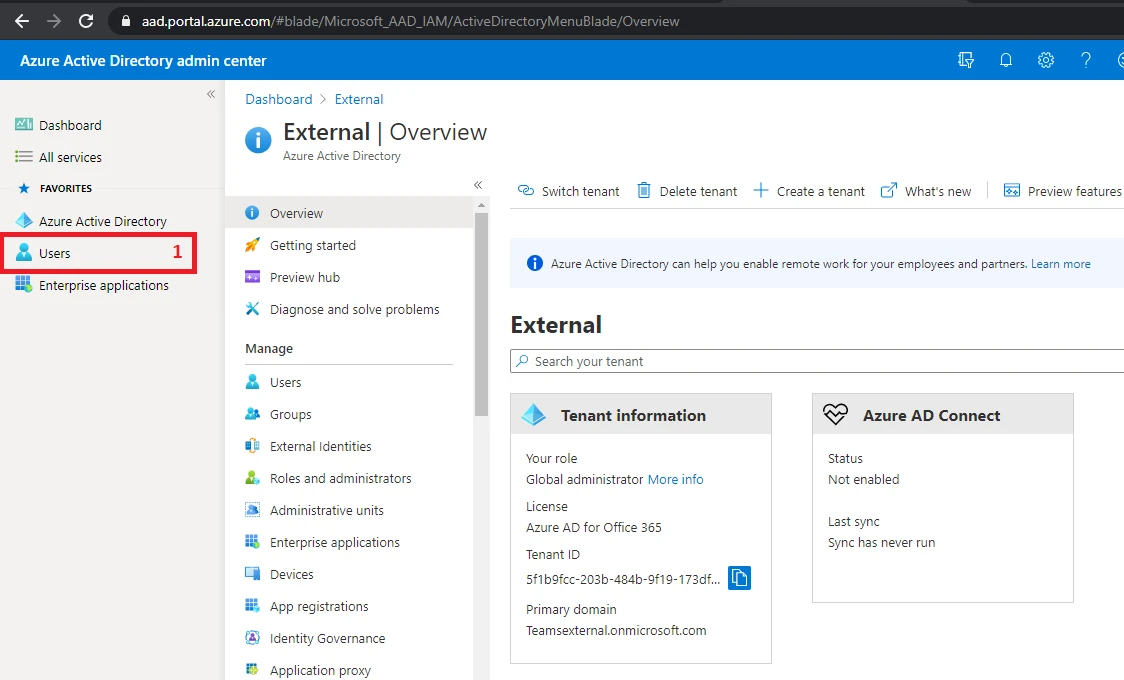
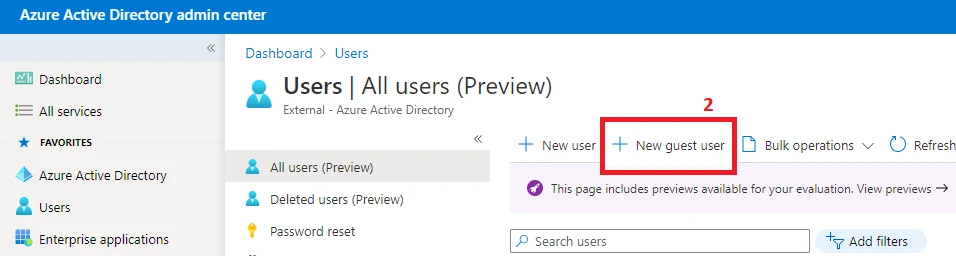
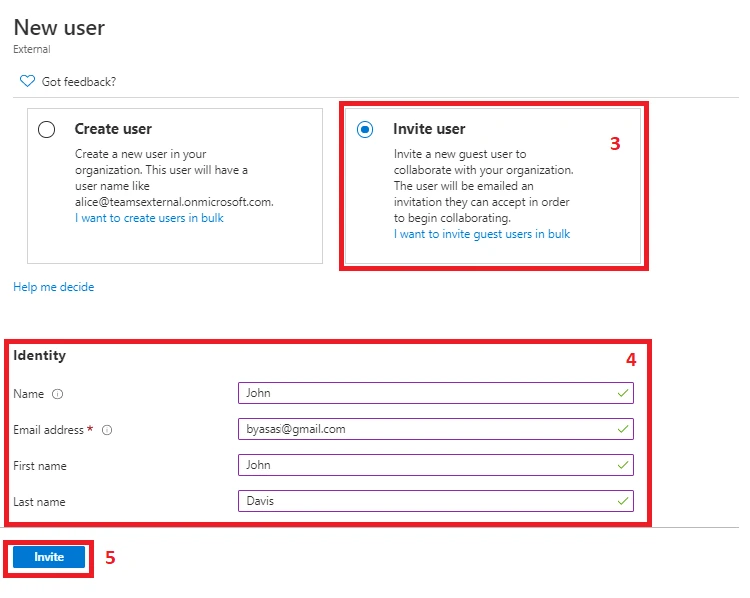
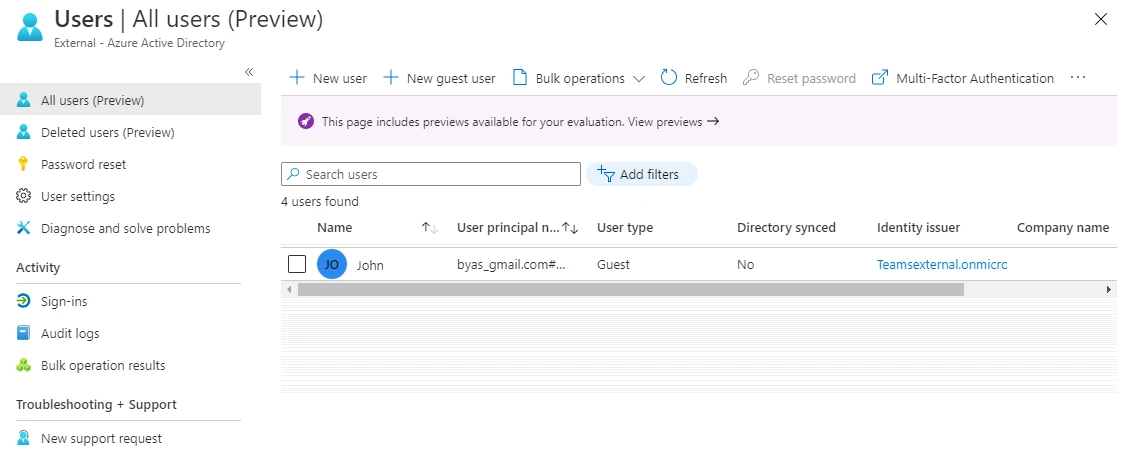
Steps to create external user in Azure AD

1. Login to Azure Portal and click on User (1)

2. Click on ‘Add guest user’ (2)

3. Select ‘Invite User’ (3), fill the details (4) and click ‘Invite’ (5)

4. Once invited, user will get added in the users list, as shown belo

Simplifying External User Management with Titan Workspace

Your long-anticipated solution for collaboration with individuals and teams external to your organization has now been created and deployed. This summer 2021, Titan Workspace was able to streamline its Guest User Portal to benefit the companies who are ready to accomplish brilliantly open communications between their internal and external teams.

Leonardo Da Vinci once stated, “simplicity is the ultimate sophistication.” Such an insightful approach that so many efficient solutionists have discovered over thousands of years. Keep it simple. This methodology was used when designing a comprehensive but simple solution within MS Teams, built with SharePoint, for sophisticated coordination with guest users.

Let’s explore the newest Titan Workspace product enhancement released summer 2021 and fine-tuned over the last few months – the enhancement that simplifies the external user management process in Azure Active Directory (AAD).

The External User Management Tool – Keeps it Simple

Who can request an external user? Any internal business user.

Who will invite the external user? Tenant Administrator or Titan Workspace Administrator.

What will provide insight into the invitation status? The “External User Management” dashboard.

What makes this process so simple?Innovation behind this comprehensive tool allowing the business users to manage their external stakeholders. This has really helped our customers to leverage external users without creating any dependency on Tenant Administrator. The entire process is automated and business users need not be able to access Azure Active Directory (AAD).

The Titan Tool – Comprehensive Design

What does the External User Management Dashboard do? The dashboard allows the Titan Workspace Administrator to quickly track the external user invitation process and giving the visual progress of the full lifecycle from invitation to acceptance. With the available filter options, any of these stages can be reviewed at a glance for ease of management.

Is it possible to remind the external user that they have not yet accepted the invite? Yes. Very efficiently, the Titan Workspace Admin can filter by the not yet accepted invitees in order to send them a reminder (all at once or one at a time). This is an invaluable process that does not exist in O365 alone.

Who manages the external user permissions and access? Unlike with the O365 external user process, Titan has eliminated the need to have the SharePoint team select what the user can or cannot access. With Titan keeping the security and accessibility of your company tenant a top priority, the external user will only be able to access the necessary collaborative items that the internal teams want to share (including documents, project information, and task assignments).

How long can external user access the system? This is managed by business users. When the external user is added, the dates that the user will need access can be defined. If those dates need to be extended, this is also possible. This is not possible with O365 where the user needs to be manually added and removed by the SharePoint team.

Can a whole external group be added with Titan? Yes. In addition to one-to-one communication that Office365 allows, Titan Workspace can define a group or a company under which different stakeholders can be added to see unified content and documents. This group can also receive group communications or individual communications as needed.

The Titan Tool – Efficiently Effective

Why use Titan when we already have SharePoint? SharePoint is a great tool that is part of M365 platform. However, SharePoint is not as user friendly – especially when needing to manage external users. Without Titan Workspace, the company’s tenant administrator (often senior level) must spend their valuable time on tedious tasks involving inviting external users, verifying individual acceptance status manually, sending individual reminder invites manually, and then personally contacting the SharePoint team and providing the necessary details for them to set the external user’s permissions separately for each external user.

What if I have thousands of external users to add because we collaborate with many subcontractors, vendors, and customers? Using O365, you will need to add each of these users individually and then designate them as external users and set their permissions. Using Titan Workspace, all the users can be requested by business users and added in one or multiple large groups by the Titan Workspace Administrator.

What is the overall benefit or ROI? Titan Workspace has demonstrated the ability to increase collaboration and productivity by at least 30% within initial 3 months of going live. Titan Workspace brilliantly unites the functional SharePoint needs of a business with operational efficiency.

At TFW Labs, our mission is to simplify Office365, allowing customers instant access to our collaborative features without difficulty. This new functionality helps us achieve our mission.

Coming soon…we will look at the detailed process for interacting with external users with Titan Workspace using the uniquely built Titan Guest User Management Portal.