What changes can Workflow Automation bring in Manufacturing Industry?

Workflow automation for manufacturing companies is transforming the industry around the world, but what specific changes can it truly enable? With relentless pressure on manufacturers to deliver higher quality products in less time and at lower costs, executives are keen to understand if the promises of automated workflows match up to the reality on the factory floor. Fundamentally, automated workflows aim to remove tedious manual tasks, improve coordination across departments, and use data-driven insights to optimize decisions – but where is the hard evidence on impact?

Will automation in manufacturing companies lead to fewer errors, rapid scalability, and greater flexibility to changing customer needs? Are there quantifiable efficiency gains when automating processes from inventory management to shop floor scheduling? Moreover, what are the more nuanced benefits in terms of cross-functional transparency, centralized tracking, reduced paperwork, and freeing up skilled labor to focus on higher-value analytical tasks? With growing investments from manufacturers into workflow automation software and solutions across their global supply chains, the industry believes the transformational potential.

What is Workflow Automation?

It refers to the automation of business processes using software and technology. It involves setting up rules and logic to automatically trigger certain actions based on defined events. This eliminates the need for human intervention for manual repetitive tasks.

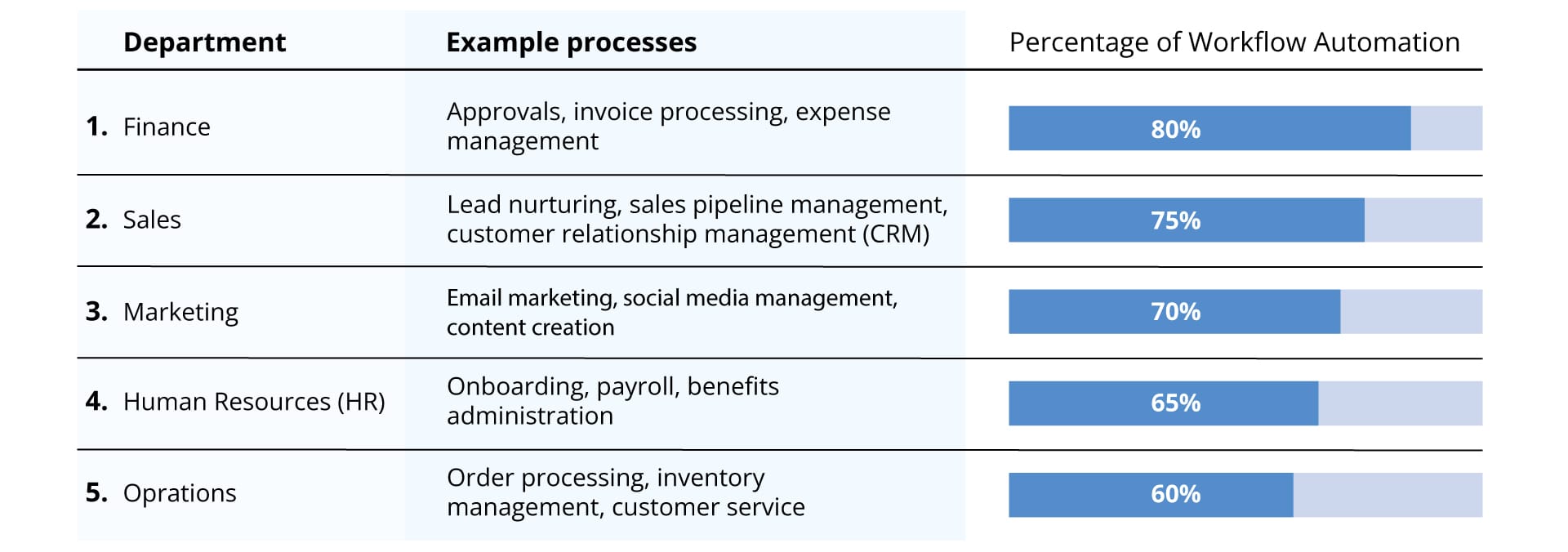
In manufacturing industries, automating workflows entails integrating systems, data, and processes to streamline operations. This could include automating anything from inventory management, production planning, quality control, coordination, and more. The goal is to reduce manual work, improve efficiency, and boost productivity.

Key Elements of Automating Workflows

Some key elements of an automated workflow include:

  • Triggering events: What event kicks off the workflow? This could be something like an order being placed, a machine breaking down, or inventory levels dropping.
  • Rules and logic: What business rules should execute when the triggering event occurs? This is the logic that determines the flow and sequences tasks.
  • Integration: How are the different systems, applications, and databases integrated? This could include document management, project, and tasks.
  • User interface: How do humans interact with and monitor the workflows? Dashboards, notifications, mobile access are important.

Changes Workflow Automation Can Bring to Manufacturing Industry

The process of Automation can completely transform manufacturing operations in the following ways:

  1. Boosting Visibility of Manufacturing Operations

    Workflow automation software gives real-time transparency into production workflows, allowing clothing manufacturers to monitor performance metrics, track bottlenecks, and leverage data analytics to optimize productivity. Digital dashboards consolidate and display key information to empower data-driven decision making on the shop floor.

  2. Driving Efficiency Improvements

    By configuring rules-based workflows, apparel companies can automatically process repetitive requests and status reports to achieve considerable cost and time savings. Workflow management solutions handle mundane tasks so employees can focus on higher value-adding activities. Built-in checks also reduce errors and compliance risks in quality assurance processes.
  3. Enabling Seamless Connectivity


    Workflow automation breaks down information silos through customizable portals that seamlessly link teams, supply chain partners and customers. Real-time coordination around developing new styles, planning production, and tracking order status becomes easier across the apparel network.

  4. Increasing Distribution and Logistics Agility

    For clothing manufacturers, automating workflows connecting procurement, manufacturing and shipping activities makes fulfilling consumer demand far more responsive. This agility in distribution coordination is key to thriving in fast-paced fashion markets.
  5. Ensuring Workplace Safety and Compliance


    By embedding safety protocols and regulations into digital workflows, workflow automation software significantly improves working conditions and adherence to policies in apparel factories. This prevents workplace accidents and helps demonstrate commitment to ESG standards.

  6. Driving Scalability and Responsiveness

    During market fluctuations or supply chain disruptions, automated workflows enable apparel businesses to reliably adapt to changing customer orders or production constraints. Built-in flexibility improves resiliency and continuity of operations.

Some major benefits to manufacturing organizations include:

  • Faster processing times by eliminating delays from manual hand-offs
  • Fewer errors by reducing human data entry and movements
  • Lower operational costs through improved productivity and efficiency
  • Better utilization of skilled labor rather than mundane tasks
  • Enhanced compliance through strict rules and audit trails
  • Flexibility to easily adapt to changing needs
  • Continuous process improvements driven by operational analytics
  • Increased visibility and control over end-to-end operations

By investing in automation software, manufacturers can boost competitiveness, responsiveness, quality, and profitability. As technologies continue maturing, wider adoption across the industry is expected.

Workflow Automation for Clothing Manufacturers

Let us consider if clothing manufacturers implement automation software, it can provide tremendous advantages. It allows clothing manufacturers to track materials, procurement tracking, expense report automation, and hire employee more efficiently through automated workflows. With this they can free up their human force to focus on more strategic task rather than repetitive manual process.

Key areas where clothing manufacturers can benefit from automating workflow include:

  • Fabric and raw materials procurement
  • Quality assurance on finished garments
  • Packaging, shipping, and coordination
  • Automated warehouse workflows
  • Demand forecasting and inventory control
  • HR Process like onboarding and offboarding employee

By eliminating the bottlenecks and delays in these processes, clothing manufacturers can tremendously boost throughput and responsiveness.

Integrate your automated workflow with Titan Workspace

There are several compelling reasons to automate workflows with Titan Workspace, particularly if you work within Microsoft 365 and Teams environments. Here are some key benefits:

  • Scalability: Easily adapt your workflows to changing needs and business growth.
  • User-friendly: No coding required, making it accessible to users of all technical skill levels.
  • No-code solution: Build complex workflows visually without any coding expertise.
  • Integration with SharePoint and Power Automate: Leverage existing Microsoft tools for a seamless experience.
  • Cost-effective alternative: Offers similar functionality to Power Apps at a lower price point.

FAQ’s

  1. How is automation changing the manufacturing industry?

    Automation is allowing manufacturing to improve quality, increase output, reduce costs, and gain agility to respond faster to market changes.
  2. What are the 5 ways in which automation has helped in the manufacturing industry?
    • Increased productivity and efficiency
    • Improved quality control
    • Created safer working conditions
    • Seamless collaboration with internal and external users
    • Saved both time and money
  3. What is the future of automation in manufacturing?

    The future of manufacturing automation is more interconnected systems, widespread adoption of AI and advanced robotics, and highly flexible reconfigurable production lines.

What is Expense report automation ?

Managing business expenses is a complex, time-consuming process. Between collecting receipts, auditing reports, seeking approvals, and reimbursing employees, finance teams sink countless hours into tracking spend. Expense report automation software aims to change that through smart features like mobile receipt capture, automated compliance checks, one-click approvals, and more.

This article explores the value automation brings to expense management – from hard cost savings to freeing up resources for value-added analysis. Read on to learn how leading finance teams leverage automated expense reporting to boost efficiency, visibility, and their bottom line.

What is Expense report automation?

An expense report is a document submitted by an employee to provide details and request reimbursement for legitimate business expenses. Expense reports track spending and help accounting teams manage budgets.

Key Elements

When we talk about the key elements of effective expense reports, includes:

  • Date, merchant name, location, expense category, payment method, and amount for each purchase request
  • Original receipts or scans
  • Business justification explaining the business purpose
  • Employee details like name, department, and reimbursement method

Using a delegated software to automate the manual reporting of the expense makes the process more efficient by extracting data from receipts, enforcing policy compliance, and integrating with accounting systems.

Further moving ahead if we talk about the key elements of automating the process, then the list of benefits includes:

  • Easy report creation with autofill from corporate card data
  • Validation against company expense policy
  • Direct integration with accounting software
  • Status tracking and reminders

Leading automation programs reporting for employees and improving visibility into spending for finance teams.

Why should you automate expense management?

Transitioning from spreadsheet hassles and email approvals to seamless automation delivers tangible rewards, including:

    • Faster Reimbursements

Automated tools process expense reports up to 80% quicker compared to manual approaches. That means no more waiting weeks for check requests and reimbursements. Employees can easily manage out-of-pocket expenses knowing that software expedites repayment into their bank account or next pay check.

    • Reduced Operational Costs

Studies show automating expense reports cuts associated processing costs by over 50% on average. The software eliminates the need for data entry clerks. It also minimizes time wasted by high-salaried approvers fixing out-of-policy claims. Allocating that human capital to strategic initiatives creates real financial impact.

    • Enhanced Visibility & Control

Automated software centralizes spending data companywide, making it easily accessible. Running reports with a few clicks gives leadership visibility into expenses across business units, projects, and more. Uncovering specific cost drivers enables targeted policies and budgets that align spending with financial goals.

    • Improved Compliance & Accountability

Manual reviews sample a fraction of expense transactions, enabling issues to slip through the cracks. Automating 100% of reports provides complete oversight. Software flags any duplicate claims or expenses missing critical backup in real-time during submission. This failsafe approach boosts compliance and streamlines audits.

    • Higher Employee Productivity

Automated mobile apps enable employees to capture business expenses seamlessly while working remotely or onsite. Intuitive tools store receipt images, populate reports automatically, and submit with one tap – no triplicate forms or Excel sheets are required. This simplifies processes for staff and minimizes time spent on administrative tasks.

What are the benefits of expense report automation?

Implementing expense report automation software delivers tangible benefits for organizations and employees. Streamlining the reporting process saves time and unlocks insights while enforcing oversight and accountability.

The key advantages of automating streamlining the reporting of expense include:

    • Increased Efficiency

Automating data extraction, policy compliance checks, approvals routing, and integration with accounting systems dramatically cuts filing time for employees while they report for the expense. Instead of manual data entry and receipt collection, reporters simply snap a photo or forward an e-receipt. Expense report automation technology handles the heavy lifting.

    • Enhanced Visibility

Automated expense reports connect directly to company financial data, giving real-time visibility into cash flow outlays. Dashboards reveal spending by category, department, project, and more while flags highlight outliers or policy violations.

    • Simplified Auditing

Electronic expense trails including itemized receipts along with automatic validation checks simplify auditing. It can be easily verified or referenced long after reimbursement.

    • Better Compliance

Automated validation of travel expense report against company policies during submission reduces mistakes that lead to rejected or adjusted reimbursements. Out-of-policy spending is also easier to identify and address.

    • Higher Employee Satisfaction

By eliminating time-consuming manual reporting, the automation of the process allows employees to focus on value-added tasks. Integrations also mean faster reimbursement after submitting.

The right automation tools pay for themselves through increased efficiencies, insights, oversight, and accountability. Employees and finance teams benefit greatly from automated solutions versus traditional reports.

Keys to good expense automation

Implementing best expense report software can transform a tedious manual process into an efficient driver of productivity and savings. However, achieving the full benefits requires attention in a few key areas:

    • Intuitive Interface

The system’s interface design has a major impact on user adoption across the organization. Prioritize simple, intuitive navigation and reporting workflows that make submission painless for employees.

    • Mobility

Look for automated systems with companion mobile apps that allow reporters to easily capture and submit expenses on the go via their smartphone. This also enables real-time reporting.

    • Custom Rules

The software should empower finance teams to configure custom validation rules aligned with company expense policies. For example, setting per diem rates for meals or mileage.

    • Accounting Integration

The best expense management systems seamlessly integrate business expense report data uploads into your general ledger, accounts payable software, ERP platform, or other accounting systems of record.

Robust reporting dashboards that break down expenditures should be included so you can analyze expenses by category, department, employee, or other variables to inform spending strategies.

Prioritizing these capabilities will help ensure your expense report automation initiative succeeds in both user adoption and ROI. The key is configurable software that both simplifies reporting for employees and gives finance leaders the oversight needed to optimize budgets.

Why automate with Titan Workspace’s expense report automation?

Titan Workspace offers a uniquely cost-effective and integrated expense report automation solution for Microsoft 365 customers looking to transform their manual reporting process.

With Titan Workspace’s automation solution, the user can seek benefits in the following ways:

  • Cost Savings – Unlike other solutions, Titan’s expense automation is included seamlessly within Microsoft 365 and SharePoint at no additional licensing fees.
  • Time Savings – Intuitive workflows, mobile capabilities, receipt parsing, and approvals integration save employees hours when filing expense reports.
  • No-Code/ Low Code Platform: With Titan’s low-code platform, you can spin up and customize an automated expense reporting system in a flash, without lengthy IT projects or coding obstacles
  • Enhanced Transparency – Integrated analytics provide real-time visibility into spending from dashboards segmented by department, category, employee, and more.
  • Boosts Productivity – By cutting time spent on expenses, Titan’s automation enables employees to focus on more strategic tasks while giving managers back time formerly devoted to approvals.

As a truly turnkey add-on to SharePoint and Microsoft 365, Titan Workspace delivers rapid time-to-value and superior user adoption for expense report automation. The result is leaner processes, accountability for spending, and more productive teams.

FAQ’S

What is automated expense reporting?

Automated expense reporting refers to software or systems that automatically gather and organize expense data to generate expense reports.

What is automatic expense tracking?

Automatic expense tracking is a tool or system that gathers information about your spending and categorizes it without requiring you to manually input each transaction.

How do you process an expense report?

To process an expense report, employees submit reports detailing business expenses they incurred, providing supporting documentation

What is a daily expense tracker?

A daily expense tracker is a simple table, spreadsheet, or journal page where individuals manually record day-to-day expenses on a granular level.

Real Estate Investor Portals: A Smarter Way to Manage Properties

For companies managing many properties, keeping investors informed is tough. Using manual spreadsheets and reports makes it hard to be clear and efficient. However, with the evolving times, real estate businesses now use the real estate investors portal. These are unique platforms that are multipurpose.

These financial asset management solutions give stakeholders access to documents, performance stats, and communication tools every time. Each person has a secure account.

Using these “Investor Management Portal” helps build good relationships by making things simple and clear. It also makes it easier to keep an eye on things.

What Problems Do these Investor Management Portal solve?

Though many challenges are there still, real estate investing can be a very profitable business. Keeping a diverse portfolio organized and informed is one of the biggest challenges that investors frequently encounter. But not anymore! The guest user portal has emerged as the right solution to all the problems.

Here are some usual challenges investors face:

  • Finding information: Investors often face a tough time while searching for the key details about their investment. The manual process of searching for information across scattered emails and files is time-consuming and inefficient.
  • Getting answers: Another time-consuming process is inquiring over a phone call or email. This takes a lot of time and can hamper productivity.
  • Data Silos: In the old methods, investor lacks access to real-time data and clear context. Lack of visibility can make it difficult for investors to make informed decisions.
  • Manual reporting churn: Gathering and distributing the latest individual portfolio details demands extensive staff hours.

Core Capabilities and Features

Although we have already discussed the problems that these investor management portals solve. But let’s try to learn more about the core capabilities and features. With a better understanding of the features, it can be easier to decide whether to opt for it or not.

The core capabilities and features of real estate portfolio management are mentioned below:

  1. Robust Investor Profiles: The portal provides a secure and safe portal. Investors can easily use a personal, password-protected account. Moreover, this account enables access to relevant portfolio documents.
  2. User-friendly Portal: The real estate property management is easy to use. The portal is intuitive and can be easily accessed on any electronic device. It provides seamless navigation for users of all technical skill levels.
  3. Instant updates: Interestingly the portal provides investors with instant updates. The updates shared include acquisition details, capital calls, or distribution notices.
  4. Secure document management: Documents play a key role in the real estate industry. By using the guest user portal investors and property management can gain a secure document management system.
  5. Compliance infrastructure: An investor management portal ensures to provision of detailed activity audit trails, and access protocols to protect sensitive materials.

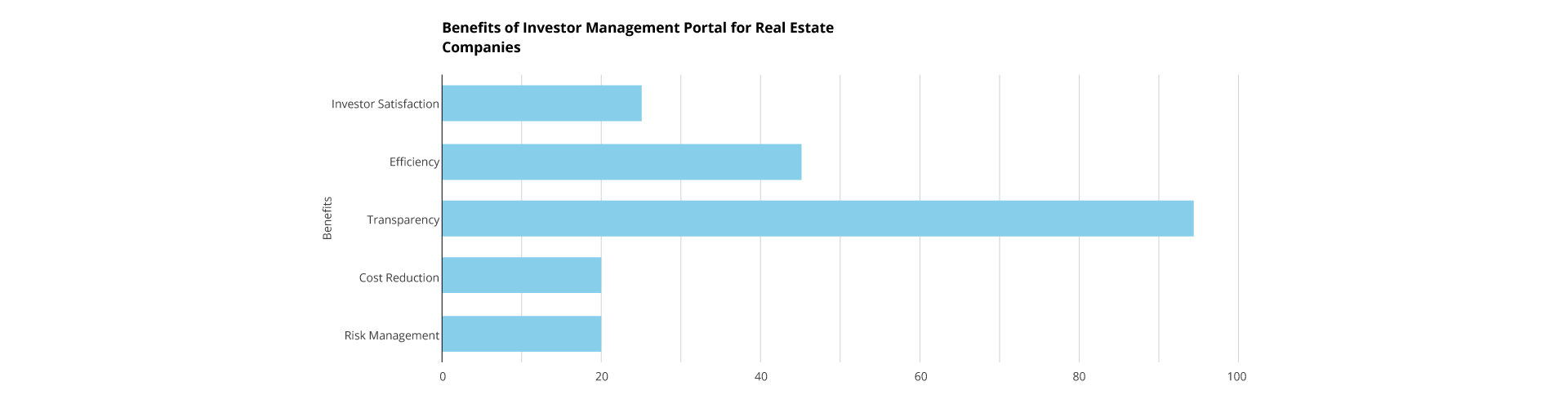
The Benefits of Adopting Software for Real Estate Investors

Moving ahead it is especially important to discuss the benefits of switching to a proper portal. With a good investment management and vendor management portal, real estate company along with their investors and vendors can achieve desired goals without any barriers.

While talking about the benefits of selecting an investor portal, the list includes:

  • The portal acts as a single destination for understanding investment positions. Investors can easily and freely access all the reports in one place.
  • The seamless portal makes it easier for investors to communicate. By delivering instant notifications it empowers investor engagement and satisfaction.
  • Using the investor portal, investors can save hours or productivity. It eliminates all the manual tasks by automating the process around financials through self-service access.
  • The real estate investor management portal provides visibility and transparency.


What Should You Look in for a Provider?

Choosing the best real estate software for investors depends on several factors:

  1. Are tools available to match company branding, data infrastructure, and investor profiles out of the box or via configuration?
  2. Can investors easily access dashboards and documents across devices like mobile, tablets, and desktops?
  3. As investor counts and portfolios expand over time, can the platform scale up easily without issues?
  4. What data and access protections like compliance processes are implemented?
  5. Are responsive technical assistance and focused training available if questions arise around management?

The Future of Real Estate Investment Management

As stakeholders expect rich digital experiences and mobile engagement tools now commonplace across sectors, investor portals should continue evolving apace through:

  • Syncing underlying data and documents across other systems like accounting tools, and CRMs. This can help to minimize duplicate data entry.
  • Leveraging machine learning to partially automate administrative tasks around investor materials. Additionally, provides smart notifications alerting to anomalies needing intervention.

The possibilities for enhancing investor oversight efficiencies expand daily. Forward-thinking portals will always strive to simplify management. While fortifying lasting partnerships between property companies and their valued capital partners through state-of-the-art transparency.

FAQ’s

1. What is an Investor Management Portal?

An Investor Management Portal (IMP) is a secure online platform that facilitates communication and collaboration between investment firms and their investors. It allows investors to access account information, portfolio performance data, documents, and other resources 24/7. The portal helps in improving transparency and investor satisfaction.

2. How much does an IMP cost?

The cost of investment management software can vary depending on the features, functionality, and number of users. Some providers offer cloud-based solutions with subscription plans, while others offer on-premises installations with upfront licensing fees.

3. Are there any security concerns with using an IMP?

Security is a top priority for IMP providers. Most solutions use industry-standard security measures. The measures focus on data security and access controls, to protect investor information.

4. How does the investor portal contribute to building productive relationships?

The portal’s emphasis on transparency, easy communication, and timely information sharing contributes to building trust and productive relationships. It creates a collaborative environment that benefits both parties in the long term.

5. What types of documents can investors access through the portal?

Investors can typically access a variety of documents, including property reports, financial statements, legal agreements, and any other relevant documentation related to their investments.

Transforming Real Estate Vendor Management with Office 365 Guest User Portal

Managing vendor relationships is a pivotal yet time-consuming task for real estate companies. From appraisers to home inspectors to cleaning crews, real estate agents must collaborate with and oversee numerous third-party partners. However, agents are already stretched thin handling client communications, paperwork, listings, open houses, and transactions.

Moreover, when it comes about the M365 users then implementing a centralized guest user portal specifically for vendor management can greatly simplify these administrative burdens. This allows real estate professionals to focus on higher-value activities while still maintaining oversight of vendor partnerships.

This article will explore best practices for leveraging a guest portal to optimize vendor relationships as part of a property management strategy.

Transformative Vendor Access Strategies for Real Estate Preservation

According to a recent report by ATTOM, approximately 1.4 million residential properties in the United States were vacant in the first quarter of 2022.

The same report indicates a 3% increase in residential properties in the process of foreclosure from Q4 of 2021, and a substantial 31% increase from one year ago. To address this issue and safeguard these homes from elements and damages, property preservation and real estate vendor management services play a crucial role, contributing to the overall safety of neighbourhoods.

In establishing partnerships for real estate vendor management, the focus is on protecting properties, avoiding violations, and minimizing costly repairs. These services not only assist servicers and investors but also foster the growth of local and regional property preservation companies responsible for maintaining these assets. ServiceLink Field Services Vendor Management adopts a partnership-first approach, with dedicated market managers and directors supporting local and regional efforts on the ground. This philosophy ensures mutual success and accountability for both ServiceLink Field Services and its vendors.

Scotese, Vice President of the Field Services Vendor Management Office for ServiceLink, emphasizes the shift to a more proactive management approach for vendors. Initially centred on order management and efficient completion of outstanding work to meet client timelines, the vendor management teams now take ownership of issues and concerns. The goal is to address feedback from the field, resolving problems promptly and avoiding vendor frustration. This change reflects a commitment to positive relationships and effective issue resolution.

Defining Goals and Strategy

The first component in the vendor management process is developing a strategy that maps to organizational objectives while meeting stakeholder needs. This means identifying internal real estate personnel who interface with vendors to understand pain points. Translate those requirements into criteria for selecting vendor partners – tracking metrics like service capabilities, pricing, and operational transparency.

Additionally, classify vendor relationships into categories like arms-length versus strategic partnerships based on level of importance. Use this vendor relationship model to inform oversight processes. With a sound external access strategy in place, you can build alignments between vendors and business goals.

Software Tools for Managing Real Estate Vendors

Once a vendor strategy is set, adopt user-friendly software that centralizes vendor data and documents to facilitate simpler management. The right real estate guest user access software includes these core features:

  • Centralized vendor profiles with capabilities, documents, licenses, certificates etc.
  • Communication portals for direct messaging with vendors.
  • Repository for storing/sharing paperwork digitally.
  • Task assignments to vendors and tracking.
  • Performance dashboards and benchmark reporting.

Robust platforms provide complete visibility over vendor activities so you can pinpoint inefficiencies and make data-driven decisions when nurturing vendor relationships. They enable best practices for real estate managing vendor without endless spreadsheets or manual oversight.

Vendor Contract Management

Vendor contracts formalize the engagement between both parties and mitigate risk exposure. Well-crafted real estate vendor contracts outline:

  • Clearly delineated scope of services aligning capabilities to needs.
  • Specific pricing models and payment processes.
  • Communication protocols and frequency.
  • Compliance standards for security, quality, ethics.
  • Service level agreements (SLAs) with performance targets & metrics.
  • Contingency plans for dispute resolution.

Store all active and archived vendor contracts within the management software for easy access when issues arise.

Streamlined Communication

A guest portal enables centralized and trackable communications between vendors and agents. Typical phone tag and email chains waste countless hours. Instead, agents can send messages, task lists, documents, and other information directly through the platform.

The portal may also allow vendors to communicate updates like completed work orders or inspection reports. As a result, details don’t get lost over email and are automatically attached to the associated property and vendor profile.

Document Repository

A guest user portal centralizes all vendor documentation in a cloud-based, mobile-accessible repository. Digitizing these documents makes them easily shareable with other agents and leadership while eliminating paperwork. Agents can also set reminders for renewing time-sensitive items like licenses or insurances.

Performance Management

Consistently monitoring vendor deliverables against targets ensures you receive services as stipulated in contracts. Typical oversight actions include:

  • Audit completed work orders against stated timelines.
  • Review analytics for delays, common defects etc.
  • Track service locations served over time.
  • Gather feedback through online ratings/reviews.
  • Schedule performance evaluations every quarter.

When deficiencies occur, enforce corrective actions through warnings, fines, probation or termination if unresolved. Holding vendors accountable to commitments preserves quality assurance and performance standards over longer-term engagements.

Summarizing Key Takeaways

As real estate deals grow increasingly complex, effectively partnering with reliable vendors through air-tight management practices is no longer optional – it’s a strategic imperative. Following these vendor management best practices using integrated software technology can help real estate leaders reduce risks, maximize savings, and focus on their core business goals.

So, in summary, a comprehensive guest user portal process requires:

  • Defining vendor strategy aligned to company objectives.
  • Acquiring user-friendly management software.
  • Establishing stringent vendor contracts.
  • Monitoring performance through robust tracking.

With the right focus and infrastructure, your real estate business can optimize value from vendor relationships long into the future. Reach out for custom guidance on implementing your vendor management system.


Conclusion

In real estate, effectively collaborating with reliable, high-performing vendors is imperative for smooth transactions and pleasing clients. However, coordinating and overseeing vendor relationships pulls valuable time away from an agent’s revenue-generating activities.

Implementing a properly equipped guest user portal helps optimize the vendor management process so agents can get back to what matters most. Centralized profiles, seamless communication, document digitization, and performance tracking provide immense oversight without excessive administrative work.

As competition increases across the real estate landscape, leveraging technology-based infrastructure like a guest portal delivers a distinct competitive advantage. Vendor relationships can shift from role confusion and frustration to aligned accountability. This allows real estate professionals to deliver exceptional client experiences powered by reliable partnerships.

FAQ’s

1. Can I upload documents and files through the Guest User Portal?

Yes, most portals allow you to upload documents such as invoices, contracts, and project deliverables.

2. Can I track the status of my invoices and payments through the Guest User Portal?

Yes, many portals provide real-time visibility into invoice status, payment history, and other financial information.

3. Can I communicate with the real estate company and other vendors through the Guest User Portal?

Some portals offer built-in messaging or communication tools, while others may rely on email or phone calls for communication.

4. What are the benefits of using a Guest User Portal for Vendor Management?

Guest User Portals in Vendor Management bring real estate companies a wealth of benefits: streamlined communication with vendors, faster document sharing and approvals, increased transparency, and accountability, and even reduced administrative costs.

What is Workflow Automation and why is it important ?

Ever been caught up in the routine of manual, repetitive work and regretted the chances of practicing strategic thought that were missed because of the operational chaos? Imagine a work environment where the constant stream of emails is handled by a well-coordinated ballet of efficiency, saving your team’s attention for the things that truly drive the business forward.

Absolutely, the importance of workflow automation cannot be overstated in such scenarios. Workflow automation plays a pivotal role in transforming a chaotic and manual work environment into a streamlined and efficient one.

A digital symphony that is rewriting the business story is workflow automation, something that is transforming. The world of e-commerce is a busy place. Imagine the change in perspective from processing orders by hand to processing orders automatically and moving smoothly from confirmation to shipping. The results speak for themselves: a workforce empowered to focus on strategic initiatives, satisfied customers, and operational accuracy.

If you are looking to explore more about workflow automation and its importance, then you are at the right place. In this write-up below we will discuss everything from what is Workflow Automation to how is bringing change in the business world.

Introduction to Workflow Automation

The process of automating tasks and procedures to increase productivity and streamline workflows is known as workflow automation. It entails utilizing software to carry out operations like sending emails, updating data, and approving requests that would typically be completed manually. Any task with a predetermined set of steps can be initiated by an event, like tasks such as notifying employees of their termination, collecting company property, and updating records.

What is the importance of Workflow Automation?

Workflow automation is important for many aspects of organizational and business operations. Let us explore the principal reasons behind its considered importance:

  • Increased efficiency and productivity: The importance of automation has a major significance in efficiency and productivity as it automates repetitive tasks. With this employee are freed up to focus on more strategic and value-added work.
  • Reduced errors: Manual and repetitive tasks are prone to errors. But automation of tasks reduces the errors and brings in more productivity.
  • Improved compliance: Workflow automation can help businesses ensure that they are compliant with all relevant regulations. This can help to avoid costly fines and penalties.
  • Enhanced customer service: Workflow automation can help businesses to provide faster and more responsive customer service. This can lead to improved customer satisfaction and loyalty.
  • Reduced costs: By automating tasks, workflow automation can help businesses to reduce labor costs and other overhead expenses.
  • Scalability: Workflow automation can help businesses scale their operations by making it easier to add new customers or products. This can lead to increased revenue and profitability.

What are the key elements of Workflow Automation?

To understand the importance of automation in business processes, it is important to first understand the key elements of workflow automation.

  • Task Automation: Talking about task automation, is the use of technology to automate repetitive tasks, freeing up time for employees to focus on achieving business goals.
  • Process Streamlining: It is the process of identifying and eliminating unnecessary steps in a workflow. This can be done by mapping out the current process, identifying bottlenecks, and implementing changes to improve efficiency.
  • Collaboration Enhancement: It is the use of technology to improve communication and collaboration among employees within the organization.

Importance of Automated Systems in Industries

Let’s explore how can various industries seek the advantages of workflow automation.

Industries that benefit from workflow automation include:

  • Healthcare: Workflow automation can be used to automate tasks such as patient scheduling, appointment reminders, and insurance claim processing. This can free up healthcare providers to focus on patient care and reduce errors.
  • Finance: Workflow automation can be used to automate tasks such as account opening, loan processing, and fraud detection. This can improve efficiency and reduce costs.
  • Manufacturing: Workflow automation can be used to automate tasks such as production planning, inventory management, and quality control. This can improve efficiency and reduce costs.
  • Retail: Workflow automation can be used to automate tasks such as order fulfilment, customer service, and inventory management. This can improve efficiency and reduce costs.
  • Human resources: Workflow automation can be used to automate tasks such as hiring, onboarding, and payroll. This can improve efficiency and reduce costs.


Specific use cases of workflow automation include:

  • Onboarding new customers: Workflow automation can be used to streamline the onboarding process for new customers. This can include automatically creating accounts, provisioning services, and sending welcome emails.
  • Processing orders: Workflow automation can be used to automate the order processing process. This can include checking inventory, processing payments, and shipping orders.
  • Approving invoices: Workflow automation can be used to automate the invoice approval process. This can include routing invoices to the appropriate approvers, tracking approval status, and notifying the vendor of payment.
  • Managing customer support: Workflow automation can be used to manage customer support tickets. This can include automatically routing tickets to the appropriate support agents, tracking ticket status, and notifying customers of updates.
  • Generating reports: Workflow automation can be used to generate reports on a variety of business metrics. This can include sales figures, customer satisfaction ratings, and operational efficiency.

FAQ’s

1. How does workflow automation improve collaboration among teams?

Workflow automation centralizes information and tasks, fostering better communication and collaboration among team members, and ensuring everyone stays updated and aligned.

2. What are the primary challenges in implementing workflow automation?

When it comes to streamlining processes, the importance of business process automation can be clearly observed. However, there are several primary challenges as well in implementing workflow automation. The list of challenges includes integration complexities, cost, technical knowledge, and risk for data security.

3. What are the future trends expected in workflow automation?

While talking about the future trends in workflow automation, includes the integration of AI and Machine Learning, enabling intelligent automation, and advanced process analytics for better insights and decision-making.

Microsoft Copilot Is Going To Be Huge. Here Are 6 Critical Things Every Business Owner Should Know

Microsoft Copilot 2023 is undoubtedly set to revolutionize the way businesses interact with Microsoft products. As a groundbreaking AI offering, it is poised to become as influential as Windows and as transformative as the cloud, paving the way for substantial revenue growth for Microsoft. As a business owner, it’s crucial to understand six key points about this cutting-edge technology:

  • While Copilot was officially launched in March 2023, access has been limited to select large enterprise clients initially. However, Microsoft expanded its availability to approximately 600 customers by June 2023. The eagerly awaited general release is expected to occur in the “coming months.” Nevertheless, due to the thorough testing and scrutiny required, the full release might be postponed until early 2024.
  • ChatGPT on Steroids: Microsoft Copilot takes the capabilities of ChatGPT to an entirely new level. The specifics of Microsoft’s relationship with OpenAI, the creator of ChatGPT, have not been disclosed, but rumors suggest that Microsoft has significant stakes in OpenAI. With integration into various Microsoft applications and platforms, Copilot will offer enhanced AI assistance.
  • Ubiquitous Integration: Once Microsoft Copilot becomes widely available, it will be seamlessly integrated into numerous Microsoft applications. Whether you’re using Office 365 applications, Windows, Bing, or various developer tools and platforms, Copilot’s functionalities will be readily accessible and present.
  • Time-Saving Potential: Copilot holds immense promise in enhancing user productivity. In applications like Word and Excel, it can assist in creating proposals, PowerPoint presentations, graphs, charts, and more based on your input. For Teams and Dynamics users, it can efficiently summarize meetings, create tasks, and even send emails with the next actionable steps.
  • Imperfect Assistance: Despite its advanced capabilities, Copilot will not be without its limitations. While it can offer a plethora of recommendations and suggestions to streamline tasks, the final decision-making authority will always rest with humans. Business owners and users must exercise their judgment when implementing the AI-generated changes.
  • Data Challenges: Microsoft Copilot heavily relies on a Large Language Model (LLM), drawing information from both the web and your organization’s internal data sources. While this data-driven approach offers tremendous potential, it may also introduce inaccuracies and incompleteness. Consequently, businesses need to address and maintain the quality of their data to ensure optimal performance.

Understanding the true potential of Microsoft Copilot 2023 is of paramount importance for business owners. It is not merely another product but a powerful tool that can cut costs, increase efficiency, drive revenues, and boost profits. Neglecting to fully grasp its capabilities could potentially leave businesses at a disadvantage compared to competitors who effectively leverage the benefits of this AI-driven offering. Embracing Microsoft Copilot as an integral part of your business strategy can pave the way for a more successful and efficient future.

Sourcehttps://www.forbes.com/sites/quickerbettertech/2023/07/12/on-ai-microsoft-copilot-is-going-to-be-huge-here-are-6-critical-things-every-business-owner-should-know/?sh=1c5a3ce22ab9

Future Trends in Property Document Management: Insights for CIOs and CTOs

Are you a CIO or CTO of a property management company grappling with the daunting task of scaling and managing a growing volume of property documents?

Yeah. The challenges of organization, compliance, and collaboration are overwhelming.

But fret not!

This blog dives deep into the evolving landscape, highlighting key trends and providing valuable insights for you to revolutionize your organization.

That’s going to bring some peace of mind as well:)

Document Management in the Property Management Industry:

Document management plays a crucial role in the property management industry. Efficient document management systems help property managers organize, store, and access a wide range of documents related to properties, tenants, leases, maintenance, and financial records.

And you know what? Timely access to accurate information is crucial for making informed decisions, reducing risks, and ensuring smooth operations.

That’s why property management companies look for a comprehensive document management solution to streamline their operations, improve productivity, and enhance customer service.

Not to mention, document sharing with investors and stakeholders demands a secure and 24/7 access. This is where Titan Workspace empowers real estate companies to create and expand a dedicated guest portal.

With secure document sharing and access control, internal users can ensure that investors only have access to relevant documents. The platform also offers customizable permission levels and enables e-signatures, streamlining approval processes.

What’s more, the Guest Portal can be branded to maintain a consistent company identity, and a dedicated mobile app allows users to securely access their documents on the go via Android and iOS devices.

The Role of CIOs and CTOs in Driving Digital Transformation and Innovation

You, as CIOs and CTOs, play a pivotal role in leveraging technology to drive digital transformation and innovation in property management.

Your expertise in identifying and implementing innovative solutions can enhance operational efficiency, mitigate risks, and improve overall business performance.

When you embrace digital disruption aligned with your business goals, you get empowered to deliver value to customers with speed and efficiency.

That puts you ahead of the competition!

Current Challenges in Property Document Management:

While document management systems have greatly improved the efficiency of Property Document Management, there are still some challenges in the field.

Let’s list them out, as they are causing some real pain

  1. Document Organization and Accessibility: Organizing and retrieving specific documents from vast repositories can be time-consuming and error-prone, which can delay decision-making and reduce efficiency.
  2. Security and Compliance: The property management industry places a high value on data security, privacy, and regulatory compliance. Data breaches and legal complications can result from vulnerabilities in document storage and sharing practices.
  3. Collaboration and Remote Access: Property management teams often work across multiple locations, so providing remote access and collaborating on documents can be challenging without proper systems in place.

Seeking a solution to these challenges? Explore a real-world example of effective property document management with Titan Workspace. Witness how this solution streamlined document workflows and elevated operational efficiency for a Property Management company.

Emerging Trends in Property Document Management:

To address the challenges faced by CIOs and CTOs, several emerging trends are shaping the future of property document management:

Blockchain for Enhanced Security and Transparency

Blockchain, a decentralized and immutable technology, provides an ideal solution for managing property-related documents like titles and ownership transfers. Its secure and scalable storage solutions have revolutionized document management.

Embracing blockchain-powered document management offers a multitude of benefits, including seamless access from anywhere, simplified collaboration, automatic backups, and enhanced disaster recovery.

By adopting cloud-based document management, organizations can boost efficiency, lower costs, and ensure the integrity of their data.

Some of its popular implementation trends are:

  • Immutable Record-keeping
  • Smart Contracts
  • Ownership Verification
  • Auditability and Compliance

AI and ML Integration

Artificial Intelligence (AI) and Machine Learning (ML) are a growing trend in property document management. It has the potential to automate various tasks, enhance data analysis capabilities, and improve decision-making processes.

These technologies can recognize patterns, and extract relevant information that allows property managers to schedule maintenance tasks more efficiently, minimize downtime, and reduce operational costs.

AI-powered document management systems can intelligently categorize and tag documents, making it easier to search and retrieve information.

Some of its trending uses are:

  • Document Classification
  • Data Extraction
  • Pattern Recognition and Analysis
  • Risk Assessment and Compliance
  • Decision Support

Cloud-Based Collaboration and Remote Access

Another important trend in property document management is the adoption of cloud-based collaboration and remote access solutions.

Using cloud-based document management solutions, property management teams can collaborate seamlessly, regardless of their geographical location.

It provides property professionals with the following benefits:

  • Scalability and Cost Efficiency
  • Centralized Document Storage and Organization
  • Version Control and Document Tracking
  • Data Security and Backup
  • Integration with Other Tools and Systems

IoT Devices

Internet of Things (IoT) devices such as sensors and smart meters are enhancing the collection, management, and utilization of property-related data, leading to improved document management processes.

It is enabling real-time data capture and proactive maintenance, along with the following other benefits:

  • Automated data collection
  • Seamless integration with document management systems
  • Enhanced maintenance and asset management
  • Improved security measures
  • Environmental monitoring
  • Remote property management capabilities
  • Predictive maintenance insights

Key Considerations for CIOs and CTOs:

While navigating the evolving landscape of property document management, CIOs and CTOs should consider several key factors:

  1. Scalability and Integration: Choosing solutions that can seamlessly integrate with existing systems and accommodate future growth is crucial for long-term success.
  2. Data Security and Compliance: Prioritizing robust security measures and ensuring compliance with data protection regulations is essential to protect sensitive property-related information.
  3. User-Friendly Interfaces: Opting for intuitive and user-friendly document management platforms enhances user adoption and reduces training time for property management teams.
  4. Collaboration and Mobility: Evaluate the solution’s collaboration features like real-time editing, commenting, and version control. Mobile access enables document access and collaboration on the go, enhancing productivity and workflow efficiency.
  5. Cost and ROI Analysis: It is vital to analyze costs and ROI before implementing a document management solution. And the analysis should consider factors such as initial investment, licensing fees, maintenance costs, and potential cost savings from improved efficiency, reduced paper usage, and minimized errors.
  6. Future Technologies and Innovation: Property document management is evolving, and emerging technologies like AI, ML, IoT, and blockchain offer substantial benefits. CIOs and CTOs should stay updated on these trends and explore how they can enhance document management.
  7. Flexibility and Customization: Property management organizations have unique requirements, and document management solutions should offer flexibility and customization options. Tailoring the system to specific workflows, document types, and user preferences can optimize efficiency and improve user satisfaction.

In Conclusion:

The future of property document management holds immense potential for innovation and efficiency gains. And don’t forget, you have a critical role to play in driving digital transformation and embracing emerging trends.

By leveraging AI and ML integration, blockchain technology, cloud-based collaboration, and IoT devices, property management organizations can overcome existing challenges and unlock new opportunities.

Well, why not explore a document management solution that ensures compliance, provides a free E-sign service, and facilitates offline working along with its suite of offerings to make your work easy, fast, and secure?

Learn more about investor reporting portal for real estate management companies

Introducing Copilot in SharePoint & 10 More Innovations for Creators

SharePoint is a powerful content platform that fuels innovation across Microsoft 365. It enables real-time collaboration, video hosting, and more. Today, we’re excited to share the latest SharePoint innovations that make it easier for everyone to build compelling sites and pages. Here are the key highlights:

  • Simpler Authoring: We’re introducing Copilot in SharePoint, which leverages natural language and AI to help you author SharePoint pages faster. It turns your words into SharePoint sites and pages, making the creation process more efficient. You can also collaborate with others in real time.
  • Compelling Content: SharePoint is receiving a major aesthetic update. You can create visually stunning sites and pages that embrace images and videos to express your brand effectively.
  • Deeper Engagement: SharePoint is integrating with email, Teams, and Microsoft Viva, allowing you to meet your readers where they work. You can measure the impact of your content and ensure better engagement.
  • Flexible Platform: We continue to invest in templates, the SharePoint Framework, and Microsoft Graph, so your existing solutions will seamlessly work with the updated user experience. You can tailor your SharePoint sites to specific workflows and integrate them with custom applications.

Now let’s dive into the details of these innovations:

Simpler Authoring:

  1. Copilot in SharePoint: This feature combines the power of Large Language Models, your data in Microsoft Graph, and best practices for creating web content. It turns your descriptions into SharePoint sites and pages, allowing you to spend less time setting them up.
  2. New SharePoint Start Page: We’re introducing a new start experience that provides inspiration for creating sites and pages. It features templates for common team and organizational communication needs, making it easier than ever to get started.
  3. Coauthoring SharePoint Pages: Editors can collaborate in real time using the Fluid framework, enabling a seamless team effort in crafting content.

Compelling Content

  • New Design and Branding Capabilities: SharePoint’s new look empowers you to create differentiated, bold, and sophisticated pages and sites. The Microsoft Fluent Design System underpins this new experience.
  • Brand Center: With the new Brand Center, you can specify fonts, colors, logos, and other design elements that reflect your organization’s identity. You can reuse these branding elements across sites, ensuring consistency.
  • Advanced Image and Video Editing: The new image editor provides advanced editing capabilities, and the updated Stream web part allows you to stream various types of videos inside your pages. Video Page templates further enhance video presentation.

Generate Engagement

  • SharePoint Pages in Email: You can preview and send full news posts as emails to your readers’ inboxes. SharePoint provides templates designed to look great in email and the web, along with unified page analytics across Outlook and SharePoint.
  • SharePoint in Teams: Connect your SharePoint page to a Teams channel to make your content easily accessible. SharePoint pages can be edited directly within Teams and Connected Templates support SharePoint pages as channel tabs.
  • SharePoint and Microsoft Viva: Microsoft Viva’s employee experience and engagement platform enhances SharePoint content reach and engagement. Viva Connections, Viva Engage, and Viva Amplify are powerful tools that complement your SharePoint content.

Flexible Platform

  • Developer Support: SharePoint continues to offer site and page templating, UX-layer parts, and plug-ins using the SharePoint Framework and data access via Microsoft Graph. These developer models remain consistent as the user experience evolves

These SharePoint innovations empower you to create compelling content, engage your audience, and leverage a flexible platform. Start exploring the new features and unlock the full potential of SharePoint in the AI era.

Sourcehttps://techcommunity.microsoft.com/t5/microsoft-sharepoint-blog/sharepoint-in-the-ai-era-introducing-copilot-in-sharepoint-amp/ba-p/3806069?s=09

What is an Intranet? Definition, Benefits and Features

As businesses grow and expand, it becomes increasingly important to ensure that internal communication and collaboration remain efficient and effective. This is where an intranet can be a valuable tool for organizations of all sizes. In this blog post, we will define what an intranet is, highlight its key features and benefits, and explain why businesses should consider using an intranet.

Intranet Definition

An intranet is a private internet that is used exclusively within an organization. It is a secure and private network that can be accessed by authorized employees, enabling them to share information, collaborate on projects, and manage internal operations.

An intranet can be thought of as a private corporate network for use by employees. It is similar to the internet in that it provides a platform for communication and collaboration, but it is limited to authorized users within the organization.

Application of Intranet

Intranets can be used for a wide range of applications within an organization. For example, they can be used for internal communication, project management, document sharing, and knowledge management. Intranets can also be used to streamline internal processes, such as HR and payroll, by providing employees with a centralized platform for accessing information and completing tasks.

Corporate Intranet

A corporate intranet is a private network that is designed specifically for use within a company. It is a secure and controlled environment that enables employees to communicate and collaborate more effectively.

Intranet Communications

One of the key features of an intranet is its communication capabilities. Intranets can be used to facilitate real-time communication between employees, such as instant messaging and video conferencing. They can also be used to create discussion forums and blogs, which can help to foster a sense of community and collaboration within the organization.

Intranet Server

An intranet server is the backbone of an intranet. It is the central hub that connects all of the different components of the intranet together. The server provides the platform for employees to access information, collaborate on projects, and manage internal operations. Read more about Boosting Sales Productivity

Features of Intranet

Some of the key features of an intranet include:

  1. User authentication and access control – Intranets are designed to be secure and private, so it is important to have a robust authentication system in place to control access to the network.
  2. Document Management – Intranets can be used to manage and share documents within the organization. This can help to ensure that employees have access to the latest version of important documents, such as policies and procedures.
  3. Collaboration tools – Intranets can be used to facilitate collaboration between employees, such as discussion forums, wikis, and project management tools
  4. Internal communications – Intranets can be used to facilitate internal communication between employees, such as instant messaging and video conferencing.
  5. Customization – Intranets can be customized to meet the specific needs of the organization, such as branding and design.

Benefits of Intranet

There are several benefits to using an intranet within an organization, including:

  1. Improved communication and collaboration – Intranets provide a centralized platform for communication and collaboration between employees, which can help to improve productivity and efficiency.
  2. Increased efficiency – Intranets can help to streamline internal processes, such as HR and payroll, by providing employees with a centralized platform for accessing information and completing tasks.
  3. Improved knowledge management – Intranets can be used to manage and share knowledge within the organization, which can help to improve decision-making and problem-solving.
  4. Enhanced security – Intranets are designed to be secure and private, which can help to protect sensitive information from unauthorized access. Also read about the Intranet vs Internet vs Extranet Difference

Why Would a Company Use an Intranet?

There are several reasons why a company might choose to use an intranet. Here are a few:

  1. Improved Communication – An intranet can be used to improve communication and collaboration within the organization. This can help employees to work more efficiently and effectively, reducing the chances of misunderstandings and errors.
  2. Centralized Access to Information – An intranet provides a centralized platform for employees to access information. This can help to reduce the time and effort required to find the information they need, and ensure that everyone is working from the same source of information.
  3. Increased Productivity – An intranet can help to streamline internal processes, reducing the time and effort required to complete tasks. This can help to increase productivity, allowing employees to focus on more important tasks.
  4. Improved Knowledge Management – An intranet can be used to manage and share knowledge within the organization. This can help to improve decision-making and problem-solving, by ensuring that employees have access to the latest information.

Purpose of an Intranet

The purpose of an intranet is to provide a private, secure platform for communication, collaboration, and information sharing within an organization. It is designed to improve efficiency, productivity, and knowledge management, by providing employees with easy access to the information and tools they need to do their jobs. Also read about the Automation in Real Estate

Conclusion

In conclusion, an intranet can be a valuable tool for businesses of all sizes. It provides a secure and private platform for communication, collaboration, and information sharing, improving efficiency, productivity, and knowledge management. By leveraging the features and benefits of an intranet, businesses can improve their internal operations and achieve greater success.

Learn More about: Efficient Real Estate Document Management and Document Management System in SharePoint

7 Advantages of a Multicultural Workplace


The world is becoming increasingly interconnected, and multiculturalism is becoming more important than ever before. Multiculturalism, as studied in AP Human Geography, refers to the coexistence of different cultures within a society. It is a concept that recognizes the importance of diversity and promotes the idea that different cultures can exist together in harmony. A multicultural workplace is a great example of the benefits of multiculturalism. In this article, we will explore the importance and benefits of multiculturalism, as well as the advantages of a multicultural workplace.

Why is Multiculturalism Important?

Multiculturalism is important for several reasons. First, it promotes cultural diversity, which has many benefits. Cultural diversity can lead to a broader range of ideas and experiences, which can help people to learn and grow. It can also help to create a more tolerant and inclusive society, where people from all backgrounds feel valued and respected.

Second, multiculturalism can lead to a better understanding of different cultures. When people of different backgrounds work together, they can learn from each other and gain a greater appreciation of each other’s traditions and beliefs. This understanding can lead to greater tolerance and respect for other cultures.

Third, multiculturalism can promote creativity and innovation. When people from different cultures come together, they bring their unique perspectives and ideas to the table, leading to more creative solutions to problems.

Finally, multiculturalism can help to address social inequalities. It can provide opportunities for people from different backgrounds to work together and learn from each other, which can help to break down barriers and promote equality.

Benefits of Multiculturalism

  1. Increased Creativity and Innovation

    A multicultural workplace brings together different perspectives, experiences, and ideas. This diversity can lead to more creative and innovative solutions to problems and challenges. Employees from different backgrounds can offer unique insights and approaches to projects that may not have been considered otherwise. A study by McKinsey found that companies with diverse workforces are more likely to outperform their less diverse counterparts in terms of innovation.


  2. Improved Communication and Language Skills

    Working in a multicultural environment helps employees improve their communication and language skills. They learn to communicate effectively with people from different cultures and languages, which can be a valuable skill in today’s global business world. This can also help to prevent misunderstandings and conflicts that can arise from cultural differences. Learn more about Intranet vs Internet vs Extranet: What’s the Difference?


  3. Better Understanding of Different Cultures

    A multicultural workplace can help employees develop a better understanding of different cultures. This understanding can lead to more tolerance, respect, and empathy for others. It can also help prevent misunderstandings and conflicts that can arise from cultural differences. This can be especially important in today’s global business world, where companies often work with people from different parts of the world.


  4. Increased Productivity

    A diverse workforce can lead to increased productivity. When employees feel valued and included, they are more likely to be engaged and motivated to work. This can lead to better performance and higher productivity. A study by Deloitte found that inclusive teams are 80% more likely to achieve better business outcomes. Learn also about Collaboration Challenges in Workplace


  5. Broader Customer Base

    A multicultural workplace can help a company appeal to a broader customer base. When a company’s workforce reflects its customer base, it can help build trust and credibility with customers. It can also lead to new business opportunities in different markets. For example, a company that has employees who are fluent in different languages can better serve customers who speak those languages.


  6. Better Decision-Making

    A multicultural workplace can lead to better decision-making. When employees from different backgrounds and perspectives come together to solve problems, they are more likely to consider all options and make informed decisions. This can lead to better outcomes.


  7. Improved Company Reputation

    A company that values diversity and promotes a multicultural workplace can improve its reputation. It can attract top talent and customers who value diversity and inclusion. It can also help create a positive brand image that can lead to increased loyalty and trust.

    Know More Benefits: https://titanworkspace.com/digital-workplace-strategy-guide-business-benefits/

Conclusion

In conclusion, a multicultural workplace has many advantages for both employees and companies. It can lead to increased creativity, improved communication and language skills, better understanding of different cultures, increased productivity, broader customer base, better decision-making, and improved company reputation. Companies that value diversity and promote a multicultural workplace can reap the benefits of a diverse and inclusive workforce.

Learn More about: Uses & Applications of an Intranet and How Employees Can Benefit from Intranet Networks with Examples